
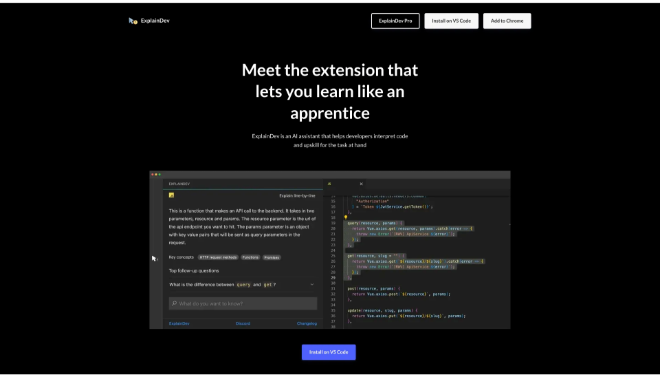
ExplainDev is a highly valuable, AI-powered tool built to enhance the understanding and efficiency of software developers.
Introduction
In modern software development, codebases are constantly evolving, growing in complexity, and often change hands between developers. The time spent simply understanding why a particular piece of code exists or what a function does can be a major drain on productivity. ExplainDev was created to be the AI-powered solution to this problem, serving as an innovative tool for code comprehension and knowledge transfer.
By integrating seamlessly into the developer workflow, ExplainDev turns code explanation into a one-click process. It removes the necessity of external documentation searches or interrupting colleagues for minor clarifications. The platform aims to accelerate learning, improve code quality through better understanding, and empower developers at all seniority levels to be more efficient. It is a fundamental shift from writing code to truly understanding code in context.
Code Explanation
Developer Utility
Contextual AI
Time-Saver
Review
ExplainDev is a highly valuable, AI-powered tool built to enhance the understanding and efficiency of software developers. It addresses the common pain point of navigating unfamiliar or complex codebases by providing instant, contextual explanations right within the user’s coding environment. This is not just a general code interpreter; it uses artificial intelligence to analyze the function, the surrounding class, and the overall context of the project to deliver highly relevant answers.
This capability is particularly beneficial for onboarding new team members, assisting junior developers, or for senior engineers dealing with legacy code. Its strength is in its simplicity, get answers directly in the code, rather than needing to copy and paste fragments into a separate chat application. While its effectiveness relies on the quality of the underlying AI (and may sometimes struggle with highly niche or poorly documented code), ExplainDev significantly reduces the mental overhead of code comprehension, allowing teams to move faster and with fewer context switches.
Features
Contextual Code Explanation
Provides natural language explanations for selected code snippets, considering the file, class, and project context for accurate answers.
In-Editor Integration
Designed to work directly within the developer's Integrated Development Environment (IDE) or coding interface, minimizing context switching.
Complex Code Simplification
Uses advanced AI features to break down and explain highly complex or convoluted sections of code into understandable logic.
Instant Q&A
Allows developers to ask specific questions about the code, receiving answers immediately in the same workspace.
Screenshot Generation
Includes the ability to create visually appealing screenshots of the AI-explained code, useful for documentation or sharing with teammates.
Code Improvement Insight
By understanding the code, the tool can potentially hint at underlying logic flaws or areas of the code that may be overly complicated.
Best Suited for
Onboarding New Developers
Accelerates the learning curve by providing instant explanations of the project's codebase and architecture.
Junior Developers
Serves as a constant, non-judgmental mentor, helping to understand complex functions and coding patterns as they learn.
Senior Developers & Architects
For quickly dissecting legacy systems, third-party libraries, or highly specialized code they are unfamiliar with.
Code Reviewers
To rapidly understand the intent of new or modified code during the peer review process, ensuring clarity and correctness.
Freelancers & Consultants
Essential for quick ramp-up time when joining a new short-term project or client codebase.
Teams Practicing Knowledge Transfer
Simplifies the process of documenting and explaining code logic when responsibilities shift.
Strengths
Real-time Context
Ease of Use
Increased Efficiency
Improves Code Documentation
Weakness
Dependency on AI Accuracy
Potential for Over-reliance
Getting Started with ExplainDev: Step by Step Guide
Getting started with ExplainDev is quick, usually requiring a simple installation and integration step.
Step 1: Locate the Plugin/Integration
Find the ExplainDev extension or plugin in your preferred IDE’s marketplace (e.g., VS Code Extensions, JetBrains Marketplace).
Step 2: Install and Authenticate
Install the extension and follow the prompts to authenticate your account (or enter an API key, if applicable).
Step 3: Select Code to Analyze
Open your project’s codebase. Highlight a function, class, or block of code you wish to understand.
Step 4: Invoke the ExplainDev Command
Use the dedicated keyboard shortcut or right-click context menu option to trigger the “Explain Code” command.
Step 5: Review the Contextual Explanation
The AI-generated explanation will appear in a separate panel or pop-up window, allowing you to read the logic in plain language without leaving your editor.
Frequently Asked Questions
Q: Does ExplainDev work with all programming languages?
A: ExplainDev uses large language models, so it can generally explain code in most popular programming languages (Python, JavaScript, Java, etc.), although its depth of understanding may vary.
Q: Does it send my code to external servers?
A: Yes, for the AI to process and explain the code, the snippet and its context must be securely sent to the cloud AI server. Users should verify the tool’s privacy and security policies (including data retention) before using it with sensitive code.
Q: Is ExplainDev only for beginners?
A: No. While it is excellent for beginners, experienced developers use it to quickly understand complex logic, legacy code, or large codebases in languages they don’t use every day.
Pricing
Specific pricing for ExplainDev is often not disclosed publicly and typically follows a flexible subscription model based on the number of explanations or users.
Free Tier
$0 (Free Forever)
Limited daily explanations; Basic features; Ideal for testing.
Individual Pro
$10 – $25/month
Unlimited basic explanations; Full contextual analysis; Priority access to new AI features.
Team/Enterprise
Custom Pricing
Per-seat pricing; Centralized billing; SSO/Security features; Dedicated team support.
Alternatives
GitHub Copilot Chat
An AI coding assistant that provides conversational Q&A and code explanations directly within the IDE, integrated with the GitHub platform.
Cursor AI
An AI-native code editor that allows developers to highlight code and ask the AI questions, offering integrated chat and editing assistance.
CodiumAI
Focuses on generating tests and documentation for code, requiring the AI to first understand the code's logic, similar to an explanation tool.
Share it on social media:
