
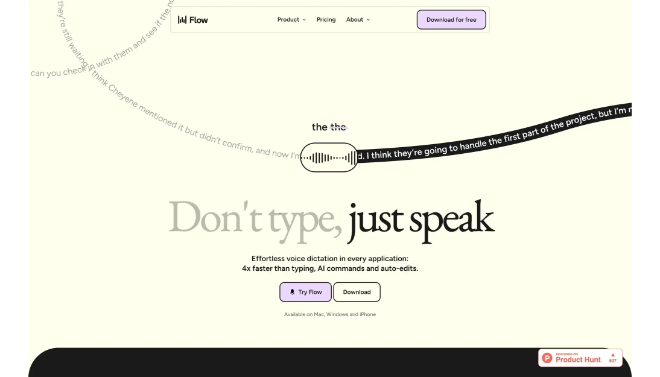
Wispr Flow is a sophisticated AI-powered dictation assistant designed to replace traditional typing with high-speed, natural-language voice input across any application.
Introduction
The way we interact with our computers is fundamentally limited by how fast we can type. Wispr Flow aims to break this bottleneck by allowing you to speak your thoughts naturally and see them transformed into perfectly formatted text in real-time. Unlike standard dictation tools that produce a “wall of text,” Wispr Flow acts as a real-time editor, automatically handling punctuation, grammar, and even complex formatting like Markdown. For professionals who spend hours in their inbox or Slack, Wispr Flow isn’t just a voice-to-text tool; it’s a creative partner that lets you communicate as fast as you think, without the physical strain of a keyboard.
System-Wide Integration
Context-Aware
filler-Word Removal
Multi-Style Dictation
Review
Wispr Flow is a sophisticated AI-powered dictation assistant designed to replace traditional typing with high-speed, natural-language voice input across any application. Developed by Wispr AI, a company focused on the future of human-computer interaction, Flow uses advanced Large Language Models (LLMs) to do more than just transcribe words—it understands context, removes filler words (like “um” and “uh”), and automatically applies correct formatting. It is widely considered the “spiritual successor” to traditional dictation software like Dragon, but built for the modern AI era.
The platform stands out for its seamless system-wide integration; it works in Slack, Gmail, Notion, WhatsApp, and even specialized coding environments without requiring any plugins. One of its most powerful features is “Styles,” which allows users to dictate a messy thought and have the AI instantly transform it into a professional email, a casual text, or a structured list. While it requires an active internet connection for the best AI processing, its ability to maintain a user’s unique voice while typing at 150+ words per minute makes it a top-tier productivity tool for busy professionals.
Features
System-Wide Dictation
Works instantly in any app on macOS or Windows—if you can type there, you can use Flow.
AI Auto-Formatting
Automatically adds punctuation, bolds key points, creates bulleted lists, and removes stutters or filler words.
Custom Writing Styles
Instantly switch between "Professional," "Casual," "Concise," or custom-made styles to match the tone of your current task.
Multilingual Support
Recognizes and transcribes over 100 languages with high accuracy, often handling mixed-language speech seamlessly.
Smart Editing Commands
Use voice commands to "delete the last sentence" or "make that sound more polite" without touching your mouse.
Vocabulary Learning
Remembers specific technical jargon, company names, and personal names that standard dictation tools usually struggle with.
Best Suited for
Executives & Founders
Clearing out massive inboxes and drafting complex memos in a fraction of the time.
Writers & Content Creators
Getting the "first draft" out quickly by speaking thoughts aloud before refining them.
Developers & Engineers
Writing documentation, PR comments, and Slack updates without breaking their concentration or taking their hands off the keyboard.
Individuals with RSI or ADHD
Reducing the physical strain of typing and helping those who find it easier to vocalize thoughts than organize them on screen.
Sales & Success Teams
Rapidly updating CRM entries and sending personalized follow-up emails after client calls.
Multilingual Professionals
Switching between languages during international business communications without changing keyboard settings.
Strengths
Human-Like Accuracy
Invisible UI
Universal Compatibility
Rapid Iteration
Weakness
Subscription Model
Privacy Considerations
Getting Started with Wispr Flow: Step-by-Step Guide
Step 1: Download and Install
Visit the Wispr Flow website and download the application for macOS or Windows. Install and grant the necessary “Accessibility” permissions.
Step 2: Choose Your Activation Key
Set a global shortcut (usually the Function key or a specific modifier) that you will hold down whenever you want to speak.
Step 3: Pick Your Style
Select a default style like “Professional.” You can always change this on the fly using the Flow menu.
Step 4: Start Dictating
Place your cursor in any text field (like a Gmail reply), hold your shortcut key, and speak naturally. Release the key to see your text appear.
Step 5: Refine and Edit
Use the “Smart Undo” if the AI misinterprets a phrase, or use a voice command to change the tone of the paragraph you just dictated.
Frequently Asked Questions
Q: Does Wispr Flow work in all apps?
A: Yes. Because Wispr Flow operates at the system level, it works in any application where you can click a cursor and type.
Q: Is Wispr Flow better than Siri/Dictation?
A: Significantly. While Siri just transcribes what you say, Flow edits what you say removing “ums,” adding punctuation, and changing the tone to suit the context.
Q: Can I use it on my iPhone or Android?
A: Currently, Wispr Flow is focused on the desktop experience (macOS and Windows), though a mobile version is often cited as a future development goal.
Pricing
Wispr Flow offers a tiered model, including a free version for casual users and more robust plans for professionals.
Free
$0.00
Limited monthly dictation time, standard AI models.
Pro
$15.00/month
Unlimited dictation, Custom Styles, priority AI models, early access.
Team
Custom
Centralized billing, shared custom vocabularies, and enhanced security.
Alternatives
Apple/Windows Dictation
Built-in and free, but lacks AI-powered formatting, filler-word removal, and stylistic control.
Dragon Professional
The traditional industry standard; highly accurate and offline, but lacks modern generative AI features and "styles".
Otter.ai
Excellent for transcribing long meetings and interviews, but not designed as a real-time "typing replacement" for other apps.
Share it on social media:
