

Start with your exact street address when you shop for home internet in Panama City, Florida. On August 4, 2026, we ran that address through every major wired, fiber, and 5G checker and found five clear frontrunners: WOW! for price, AT&T Fiber for raw speed, Xfinity for near-universal cable reach, T-Mobile 5G Home for plug-and-play setup, and Verizon 5G Home for existing Verizon customers. Download the Broadband Facts PDF for any provider you consider – the label beats citywide averages and neighbor anecdotes every time.
Best home internet in Panama City at a glance
Need the TL;DR? The table below lines up our five winners side by side so you can scan price, speed, and terms in seconds.
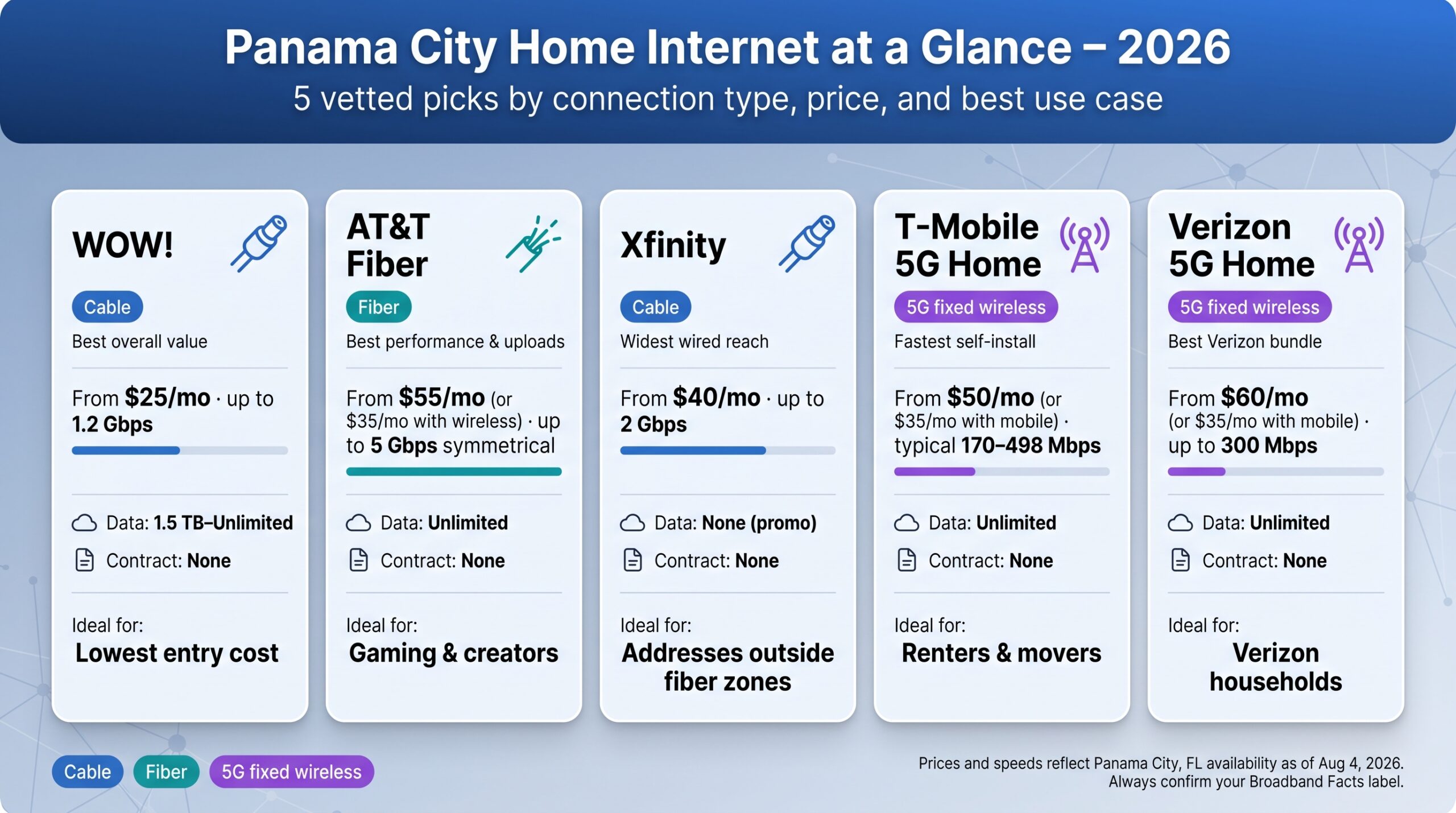
| Provider | Why we chose it | Connection | Starting price * | Max local speed † | Data cap | Contract | Ideal for |
| WOW! | Best overall value | Cable | $25/mo. | 1.2 Gbps | 1.5 TB – Unlimited | None | Lowest entry cost |
| AT&T Fiber | Best performance & uploads | Fiber | $55/mo. standalone<br>$35/mo. with wireless | 5 Gbps | None | None | Gaming, creators |
| Xfinity | Widest wired reach | Cable | $40/mo. | 2 Gbps | None (current promo) | None | Addresses outside fiber zones |
| T-Mobile 5G Home | Fastest self-install | 5G fixed wireless | $50/mo. standalone<br>$35/mo. with eligible T-Mobile mobile | Typical 170–498 Mbps | None | None | Renters, movers |
| Verizon 5G Home | Best Verizon bundle | 5G fixed wireless | $60/mo. standalone<br>$35/mo. with eligible Verizon mobile | Up to 300 Mbps | None | None | Verizon households |
*Prices verified August 4, 2026 with eligible autopay or paperless billing where required.
† Maximum or typical speeds reflect the fastest tier currently offered to Panama City addresses. Always confirm the Broadband Facts label for your exact street.
1. WOW! best overall value
That $25 starting price really does hold: the Panama City, FL internet service page lists the same figure even after WOW!’s mid-2026 refresh, so you’re not chasing an outdated promo.
Why WOW! tops our list
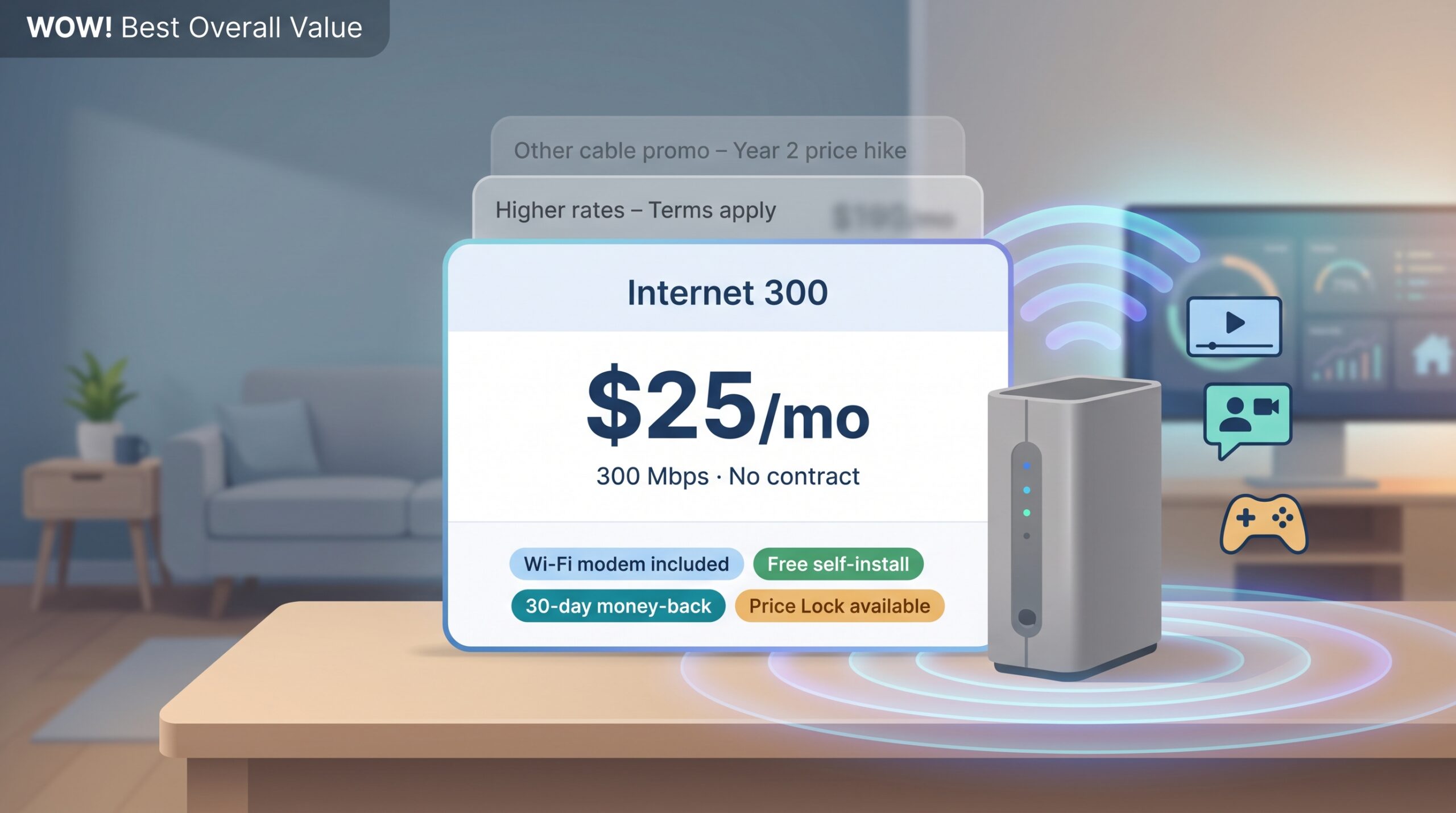
WOW! delivers more speed per dollar than any other wired plan we found in Panama City. On August 4, 2026, the provider’s 300 Mbps Internet plan cost $25 per month with AutoPay and paperless billing, with no contract, a Wi-Fi modem included, and an optional $5 Price Lock for Life add-on that freezes the base rate.
A $25 bill keeps Netflix, work calls, and game patches moving. Add the optional $5 Price Lock for Life and that rate holds for as long as you stay on the same speed, which is what stops the year-two jump many cable promos hide. A 30-day money-back guarantee and a free self-install kit also remove the usual headaches, though WOW does bill a $10 self-installation activation charge.
Plans and pricing at checkout
WOW!’s menu is straightforward. Internet 300 is the advertised entry point at $25 a month, and WOW’s published rate card puts the tiers above it at $55 for Internet 600, $70 for Internet 1 Gig and $105 for Internet 1.2 Gig. Price Lock for Life adds $5 to whichever you pick.
All tiers include the gateway, but only the 1.2 Gig plan has unlimited data. Other tiers carry 1.5 TB to 3 TB caps with $10 per 50 GB overages, capped at $50 a month, so run your own usage before you assume the cheap tier is the cheap tier. Advertised rates assume paperless billing, and WOW’s published Paper Statement Fee is $4 a month if you want a bill in the post. Uploads run 20–50 Mbps.
One thing to know before you sign: $25 is WOW’s advertised promotional entry price, while its published standard rate for Internet 300 is $40. Download the address-specific Broadband Facts PDF at checkout and check which of the two your contract names, and whether Price Lock for Life is on it.
Where WOW! is (and isn’t) available
Service is strongest in ZIPs 32401, 32404 and 32405, which is the footprint WOW publishes: Historic Downtown, Glenwood and Millville, out through Hiland Park and Callaway. Head west across the bridge toward Pier Park and the beaches and cable coverage falls away, so many movers switch to Xfinity or a 5G option. Condo residents should confirm that the line reaches the unit, not just the telecom room, especially when an HOA bulk contract is in place.
Quick test: if the availability page returns a Broadband Facts label in under a minute, you’re good. If it asks for a callback, treat that as unavailable today and price the next provider.
2. AT&T Fiber best for speed, uploads, and gaming
Why AT&T Fiber leads on performance
When your address qualifies for AT&T Fiber, you get the fastest, most balanced consumer line in Bay County: 300–5,000 Mbps down and up on a single strand of glass. That symmetrical bandwidth trims multiplayer ping, shortens cloud-backup times, and keeps video calls razor-sharp.
Unlimited data, an included Wi-Fi 6 gateway, and a month-to-month term mean you pay purely for speed with no surprise caps or early-termination fees. AT&T also tops recent J.D. Power satisfaction charts for the wired South region, according to AT&T.
The one catch is footprint. A street in Lynn Haven might show gig-fiber while the next block drops to DSL, so always run the full address before you celebrate.
Plans, pricing, and the autopay fine print
AT&T simplified its menu in June 2026:
| Tier | Download / upload | Price with bank-draft AutoPay* |
| Internet 300 | 300 / 300 Mbps | $55/mo |
| Internet 500 | 500 / 500 Mbps | $70/mo |
| Internet 1000 | 940 / 940 Mbps | $90/mo |
| Internet 2000 | 2 Gbps symmetrical | $110/mo |
| Internet 5000 | 5 Gbps symmetrical | $125/mo |
Drop AutoPay or switch to a credit-card draft and the bill rises $10 per month. Customers with an eligible AT&T wireless plan can save another $20 per month. Prices verified August 4, 2026 on AT&T’s Panama City fiber page.
All tiers include unlimited data, the gateway, and no contract.
Fiber pockets, copper gaps
Fiber traces major corridors Downtown and Hiland Park, then splinters into cul-de-sacs around Lynn Haven. Blocks near Pier Park often lose fiber even when streets a mile east advertise gig speeds. If the checker shows “up to 100 Mbps,” that’s legacy DSL; treat it as a backup, not a comparable product.
Condo considerations
Many Panama City Beach condos still distribute internet over coax or building Ethernet. Before ordering, ask management:
- Does fiber terminate in the telecom room?
- Who pays to run it to the unit?
- Is resident-owned equipment allowed?
- Are wall-plate upgrades hiding in closing costs?
When the Broadband Facts label glows green, lock it in. If it doesn’t, Xfinity cable or a strong 5G plan is usually the next-best move.
3. Xfinity best for wired coverage almost everywhere
Why Xfinity lands third
Xfinity almost always reaches your curb when fiber stops at the next block. The hybrid fiber-coax network passes roughly 90 percent of Bay County homes, and its current Panama City offer is strong: 300 Mbps internet, Wi-Fi gateway, and unlimited data for $40 per month with bank-draft AutoPay and paperless billing, with the base rate locked for five years and no contract.
Check your exact address on the Xfinity website to download the Broadband Facts label.
A 60-month guarantee is rare; most cable promos rise after 12 months. You’ll still pay taxes and the regional broadcast fee, but the service line itself stays at $40 until 2031.
Plans, pricing, and what the five-year lock covers
| Tier | Download | Typical upload* | Price w/ bank-draft AutoPay | Notes |
| Fast | 300 Mbps | 20–100 Mbps | $40/mo | 5-year price lock |
| Superfast | 500 Mbps | 20–100 Mbps | $50/mo | 5-year price lock |
| Gigabit | 1,000 Mbps | 35–200 Mbps | $70–80/mo | 5-year lock where available |
| Gigabit X2 | 2 Gbps | up to 200 Mbps | $100–120/mo | Limited footprint |
*Upload speed depends on whether your node has received Xfinity’s mid-split upgrade. Check the Broadband Facts PDF; some streets still top out near 20 Mbps upstream.
Key fine print:
- Payment method. The $40 rate reflects a $10 AutoPay discount for bank-account draft. Using a credit card raises the bill to $50.
- Guarantee scope. The five-year lock covers the base internet charge only; taxes and pass-through fees can rise.
- Unlimited data. The current promo waives Xfinity’s usual 1.2 TB cap. Keep the label; it shows whether the waiver applies at your address.
Bottom line
If AT&T Fiber skips your street, Xfinity’s wide reach and multi-year stability make it the most practical wired fallback. Confirm the upload line on the label before you hit “order,” because that single number decides whether cable is fast enough for your cloud backups and livestreams.
4. T-Mobile 5G Home Internet best for renters and easy self-installation
Why T-Mobile makes the cut
T-Mobile’s gateway takes about 15 minutes to set up: unbox the gray unit, plug it into a wall outlet, and connect your devices. No trenching, no technician visit, and no condo roof antenna. For renters or homeowners who can’t drill through stucco, that simplicity is priceless.
Typical speeds in strong Ultra Capacity coverage land between 170 and 498 Mbps down and 15 to 68 Mbps up, according to T-Mobile’s published range. That is plenty for 4K streaming, video calls, and smart-home traffic, although speeds can dip during weekend congestion. A five-year price guarantee and unlimited data soften the risk because you can cancel anytime without an early-termination fee.
Portability is the closer: move across town, pop your address into the checker again, and plug the gateway in the same night. Snowbirds can pause service for a season instead of paying year-round.
Pricing (August 4, 2026):
- $50/mo. standalone
- $35/mo. with an eligible T-Mobile mobile line
Both tiers require AutoPay and paperless billing, include the Wi-Fi gateway, unlimited data, no annual contract, and the five-year guarantee.
Check your exact address on the T-Mobile Home Internet page to confirm coverage and typical speed before you order. If the checker shows “service unavailable,” tower capacity is full. Slide to Verizon 5G Home or a wired option until a slot opens.
5. Verizon 5G Home Internet best for Verizon mobile customers
Why Verizon earns a spot
Verizon rewards loyalty: pair a 5G Home fixed-wireless plan with an eligible Verizon Unlimited mobile line and your home internet falls to $35/mo. with AutoPay and paperless billing. The bundle includes unlimited data, a Wi-Fi 6E router, and a three-, four-, or five-year price lock depending on the tier.
Performance and equipment
In strong Ultra Wideband coverage we’ve seen 200–300 Mbps down and 20–35 Mbps up, fast enough for 4K streaming, cloud syncs, and moderate-ping gaming. The included router supports Ethernet and tri-band Wi-Fi, so you skip rental fees common with cable.
Plans and pricing (August 4, 2026)
| Plan | Download (up to) | Price w/ eligible mobile | Stand-alone price | Price-lock term |
| 5G Home | 100 Mbps | $35/mo | $60/mo | 3 years |
| 5G Home Plus | 150 Mbps | $45/mo | $70/mo | 4 years |
| 5G Home Ultimate | 300 Mbps* | $55/mo | $85/mo | 5 years |
*Speed tiers are “up to” figures. Actual performance varies by tower load and signal strength. Check your exact address on Verizon’s 5G Home Internet page before you order.
Availability caveats
Verizon pauses new sign-ups when a cell sector nears capacity, so two houses on the same street can see different results. Run the checker, verify your tier, and stress-test the line during the 30-day guarantee, especially on weekend evenings. If speeds sag or availability shows “waitlist,” shift to Xfinity cable or fiber until a slot opens.
Locking 5G Home in at $35/mo. is a clear win for households already on Verizon mobile; everyone else should weigh the bundle savings against wired-network consistency.
Other Panama City internet providers worth checking
EarthLink: same wires, different bill
EarthLink resells AT&T Fiber, Verizon 5G Home, and Xfinity cable under its own brand. A Panama City landing page advertises $24.95/mo. for the first three months, but the bill jumps to about $60/mo. in month four, and equipment rental adds roughly $15/mo. Many fiber tiers still carry a 12-month contract; break it early and you pay prorated fees even though the underlying AT&T line is month-to-month. EarthLink is helpful if you want one provider across multiple addresses or value its U.S.-based support desk, but everyone else should price the original carriers first.
Starlink: rural reach, premium price
Low Earth orbit satellites cover farms, fish camps, and long driveways that wired and 5G signals miss. Hardware costs $349, and residential service runs $55–$120/mo. depending on the current plan. Expect about 200 Mbps down and 30–70 ms latency once the dish has a clear sky view. It works as a lifeline but is pricey as a main line.
Clearwave Fiber: the PCB wildcard
Clearwave advertises symmetrical 7 Gbps in select Panama City Beach subdivisions south of Highway 98. Availability can change block by block, so run the address check if you live in a new master-planned community. Until the footprint grows, treat Clearwave as a pleasant surprise, not a sure bet.
Mediacom/Xtream: verify before you move
Mediacom lists gigabit cable across Florida, but FCC data shows only small slivers of Bay County in footprint. Conflicting comparison-site claims (1 percent vs. 100 percent) and limited local chatter mean you should insist on a written quote tied to your exact address before scheduling service.
Viasat and Hughesnet: last-resort satellites
Geostationary options still reach every inch of the Gulf Coast, yet come with higher latency, smaller priority-data buckets, and monthly prices that often top cable. Choose them only when trees block Starlink’s view and no wired or 5G alternative reaches the driveway.
How we ranked Panama City’s top five providers
Each winner earned its spot through a weighted scorecard that mirrors the questions locals ask most:
- Effective value & price stability (25 %) – We compared intro prices with the post-promo or price-lock figure and flagged any AutoPay strings.
- Performance (25 %) – Download, upload, and latency. Symmetrical fiber topped the chart; cable and 5G gained bonus points for mid-split or low jitter.
- Verified local availability (20 %) – Address-level coverage beat citywide marketing maps.
- Terms (15 %) – Contracts, data caps, and equipment fees. Unlimited data and month-to-month plans scored highest.
- Customer-experience evidence (10 %) – Regional J.D. Power and ACSI scores plus Panama City subreddit sentiment.
- Differentiating perks (5 %) – Lifetime price locks, Wi-Fi 7 gateways, and seamless move policies.
Condensed scorecard
| Provider | Value | Performance | Availability | Terms | Service evidence | Perks | Total /100 |
| WOW! | 24 | 20 | 18 | 14 | 6 | 5 | 87 |
| AT&T Fiber | 20 | 25 | 12 | 14 | 9 | 4 | 84 |
| Xfinity | 21 | 20 | 20 | 12 | 7 | 3 | 83 |
| T-Mobile 5G Home | 19 | 15 | 15 | 15 | 8 | 4 | 76 |
| Verizon 5G Home | 16 | 13 | 15 | 15 | 7 | 5 | 71 |
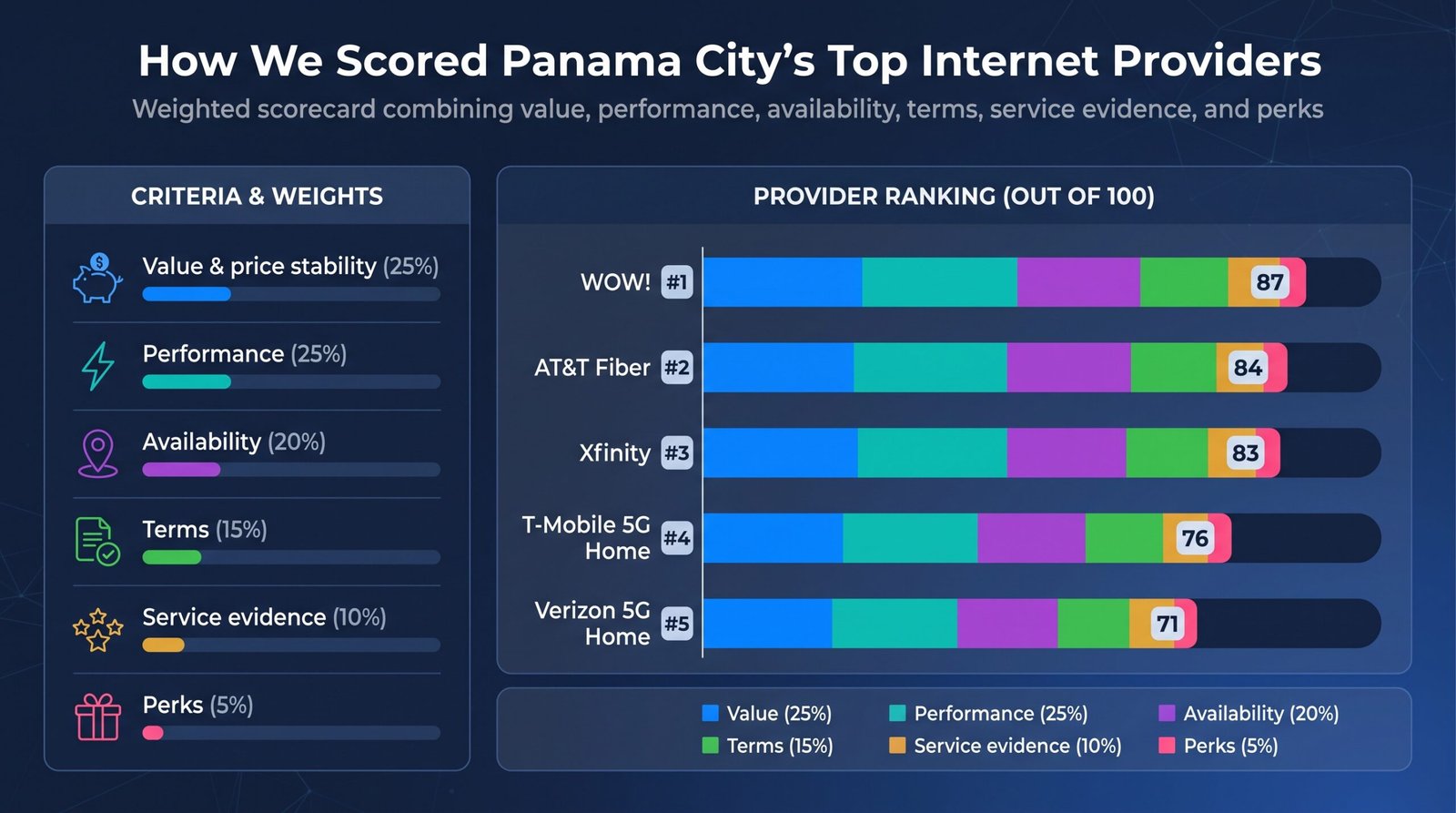
WOW!’s low entry price nudged it past AT&T’s raw speed, while Xfinity’s broad footprint kept it on the podium despite slower uploads. Fixed-wireless services stayed competitive thanks to flexible terms and multi-year price locks, even though tower congestion can cap peak speeds.
Feel free to adjust the weights. If only one provider reaches your driveway, availability may matter more than price or uploads. The point is transparency, so you can tune the dials and choose the best fit for your household.
How to choose home internet in Panama City
Start with the exact address, not just the ZIP
A single ZIP can mislead. One side of 32413 near Pier Park sees three wired providers, while the other shows “unavailable” for both fiber and cable. Even units in the same condo tower can differ because each riser or HOA contract is separate.
- Run every provider’s address checker. Enter the full street address, unit number included.
- Download the Broadband Facts label. That one-page PDF lists promo price, regular price, uploads, data policy, fees, and contract term for your location. Save it; the label outranks ads, social posts, and even this guide.
- Treat a “join the waitlist” screen as unavailable today. Plan around another provider.
- Beware “up to 100 Mbps” results. That means legacy DSL, not fiber, and usually comes with data caps and a higher cost per Mbps.
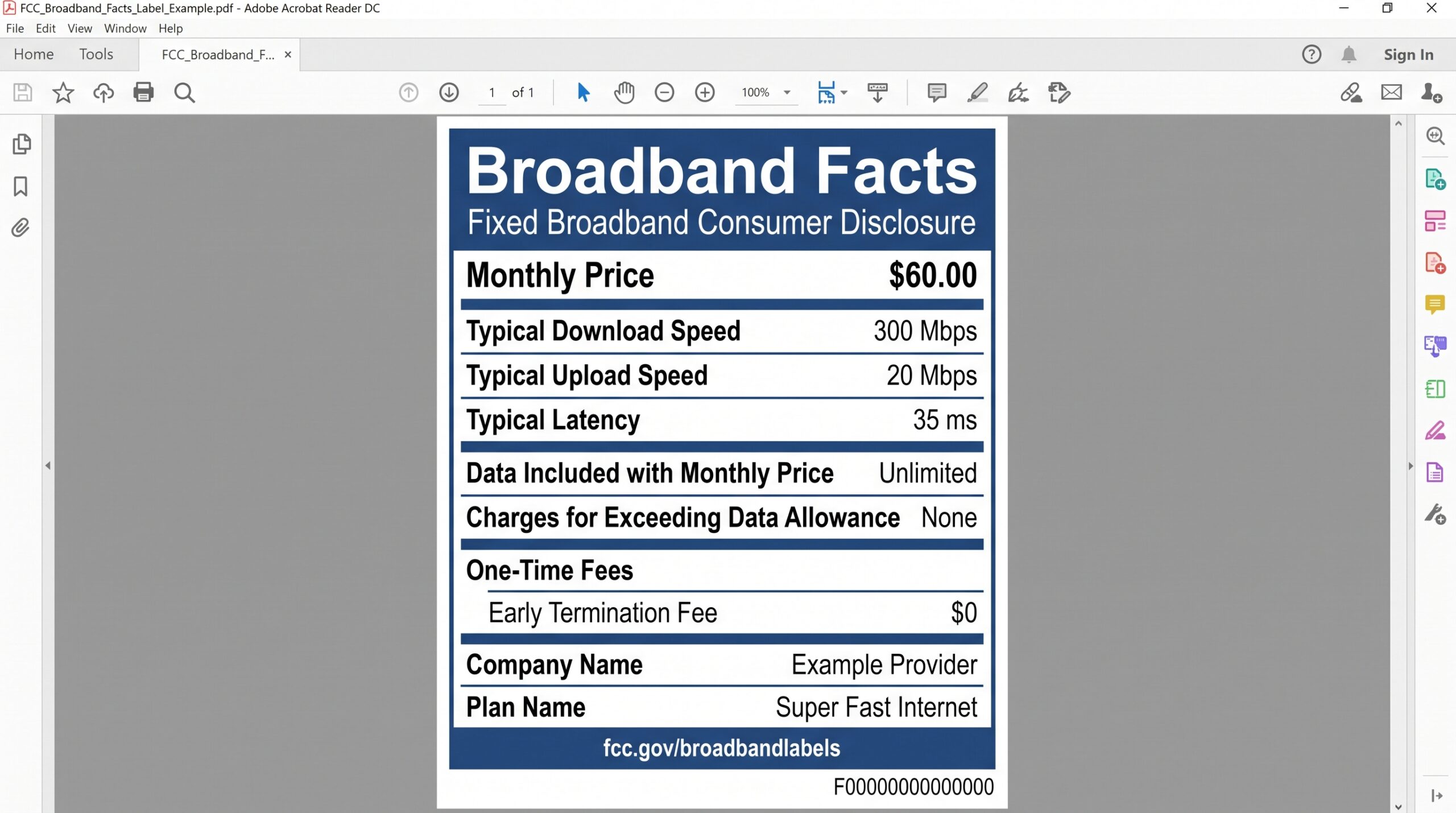
Example Broadband Facts Label for Home Internet Plans.
Run the address test first, then compare speed tiers, prices, and terms.
Panama City neighborhood snapshot: where each provider really shows up
Service can flip from fiber to “unavailable” in a single block. We ran address checks in seven busy areas to spot the most common patterns.
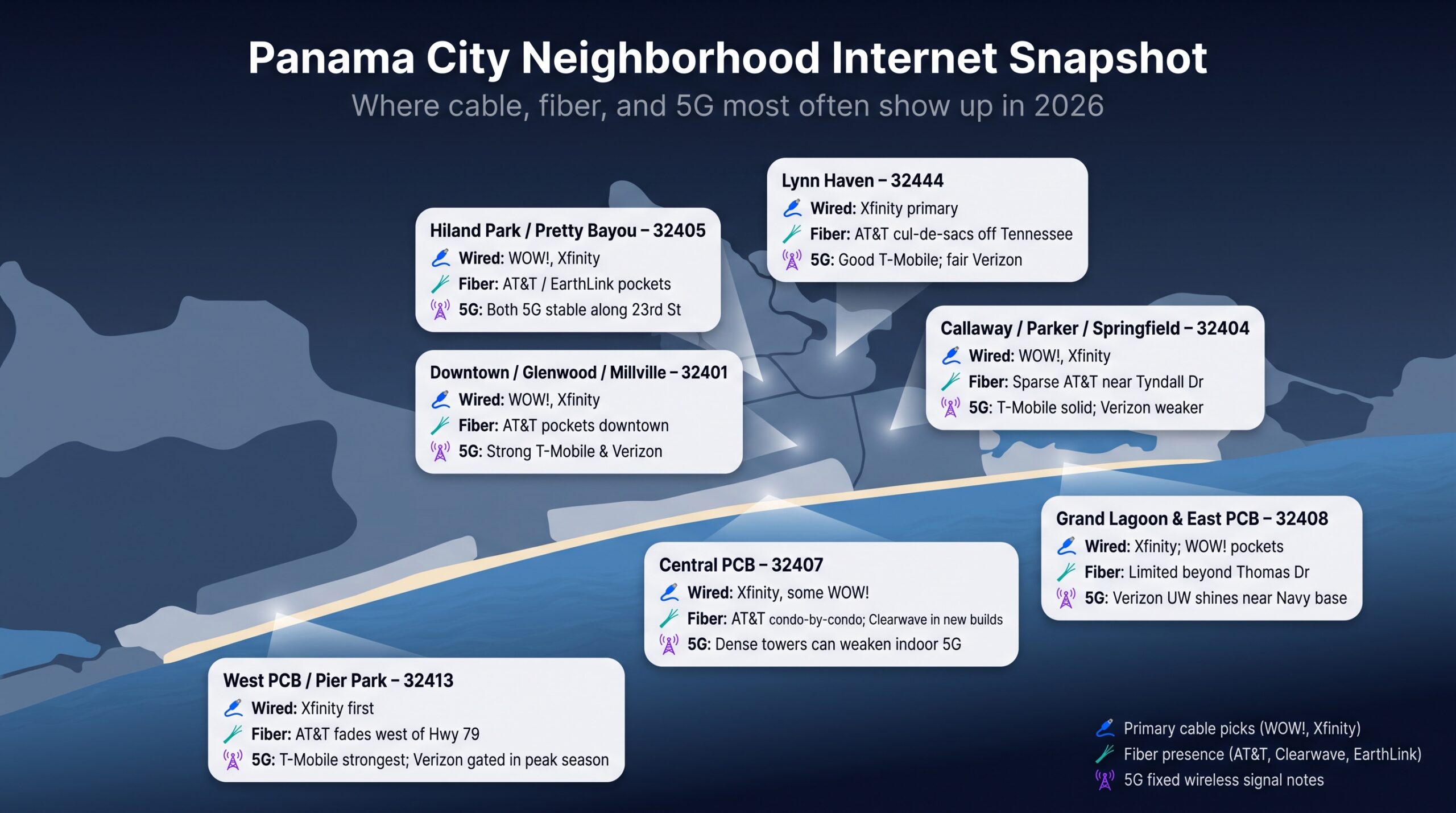
| Area & ZIP | Likely wired pick(s) | Fiber observations | 5G signal notes |
| Downtown, Glenwood, Millville – 32401 | WOW!, Xfinity | AT&T Fiber pockets downtown; cable east of Cove Blvd | Strong T-Mobile and Verizon |
| Callaway, Parker, Springfield – 32404 | WOW!, Xfinity | Sparse AT&T Fiber near Tyndall Dr | T-Mobile solid, Verizon weaker near wetlands |
| Hiland Park, Pretty Bayou – 32405 | WOW!, Xfinity | Scattered AT&T/EarthLink Fiber north of Hwy 390 | Both 5G options stable along 23rd St |
| Lynn Haven – 32444 | Xfinity primary | Surprise AT&T Fiber cul-de-sacs off Tennessee Ave | Good T-Mobile, fair Verizon |
| Central PCB – 32407 | Xfinity | Condo-by-condo AT&T Fiber; Clearwave in new builds | Dense towers can weaken indoor 5G |
| Grand Lagoon & East PCB – 32408 | Xfinity | Limited fiber beyond Thomas Dr | Verizon Ultra Wideband shines near the Navy base |
| West PCB / Pier Park – 32413 | Xfinity first | AT&T Fiber fades west of Hwy 79 | T-Mobile strongest; Verizon may gate capacity in peak season |
Treat these as tendencies, not guarantees. A new splice or tower upgrade can change your block overnight, so always confirm with the provider’s Broadbaand Facts PDF for your exact address.
Beach condo checklist
Condo wiring and HOA rules can turn an “available” result into a no-install surprise. Before you sign a lease or schedule an installer, ask management these seven questions:
- Does the HOA have a bulk internet contract that overrides personal plans?
- Which providers can run service to this unit, not just to the telecom room?
- What type of in-unit drop is installed (coax, Ethernet, fiber) and who pays to upgrade it?
- Are exterior antennas or satellite dishes allowed on balconies or the roof?
- Is Wi-Fi already covered by monthly dues, and can you opt out without a fee?
- Can residents use their own routers or mesh systems, or is managed Wi-Fi mandatory?
- Who owns and maintains the inside wiring if a technician needs to replace a jack or wall plate?
Document the answers in writing and keep the Broadband Facts label for the approved provider. Five minutes of questions now can save weeks of missed appointments and unexpected charges later.
Internet for seasonal homes, RVs, and backup service
One connection rarely fits every scenario
Weekend tourist surges, off-season vacancies, and hurricane outages mean most households need a primary line and a fallback.
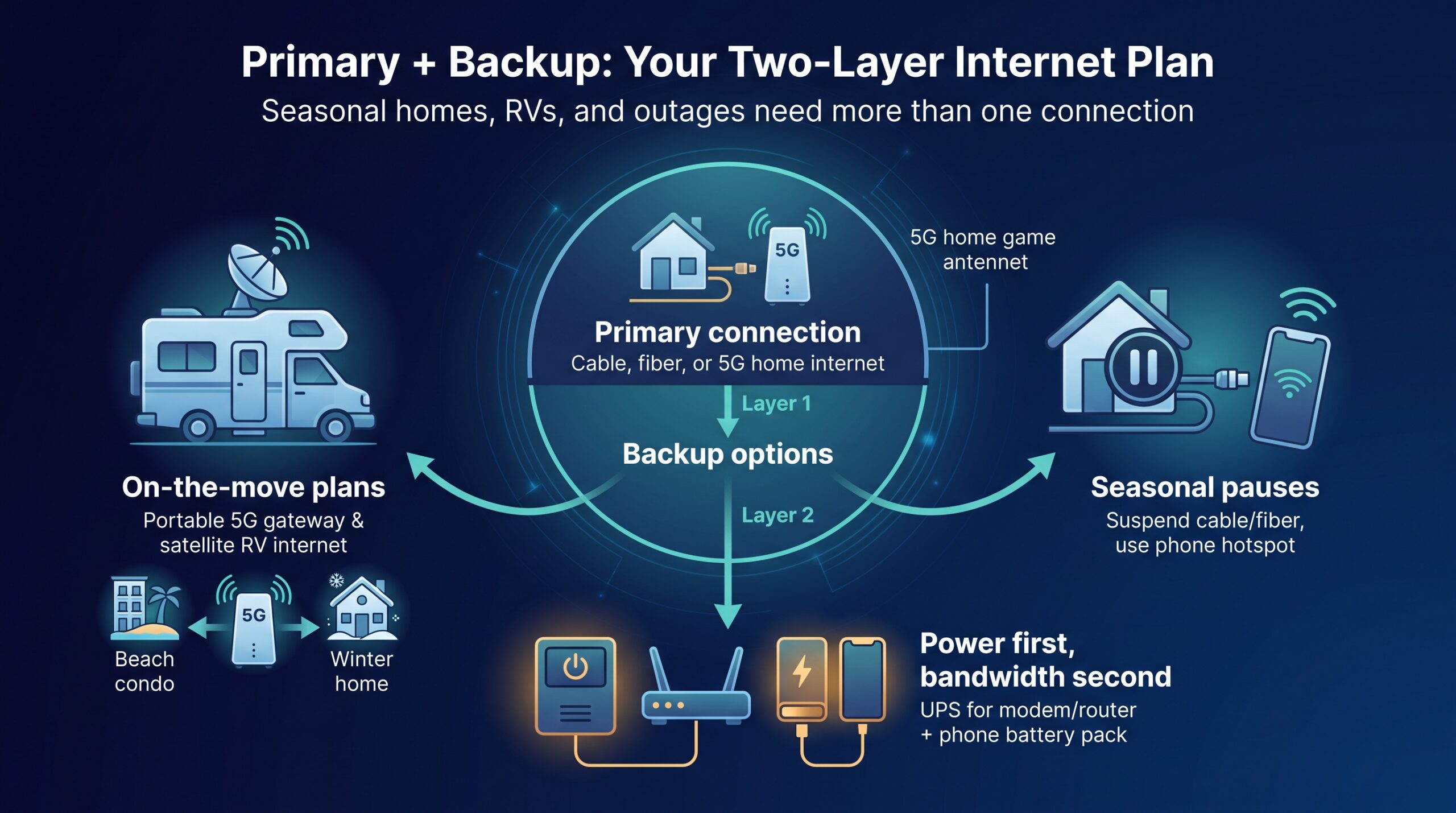
- On-the-move plans
- T-Mobile AWAY: take the 5G gateway between your beach condo and winter address, about $60/mo. with AutoPay.
- Starlink Roam: nationwide satellite for RVs; $349 hardware plus $150/mo., clear sky required.
- Seasonal pauses
Ask each provider directly whether a seasonal hold exists on your account and what it costs before you cancel anything. WOW publishes a $22 reactivation fee on a soft disconnect and $40 on a hard disconnect, so a winter away can cost more to restart than it saves. Pair whatever you arrange with a prepaid phone hotspot for light browsing until you reactivate the main line. - Power first, bandwidth second
A $40 UPS keeps your modem and router alive for roughly 40 minutes. Add a phone battery pack and you have an instant hotspot if the neighborhood node still has signal.
Build this two-layer plan now, and you won’t scramble for Wi-Fi when tourist crowds, or the next thunderstorm, knock speeds offline.
Before you sign up: the five-minute consumer-protection drill
A promo banner is marketing. The Broadband Facts label is the contract. Spend five minutes on this six-step checklist and you’ll dodge most billing surprises.
- Save the Broadband Facts PDF. Screenshot or download it so you can prove price, speed, and term later.
- Note the promotion end date. Add a calendar alert 30 days before the credit expires or the multi-year lock resets.
- Verify the payment requirement. If the rate depends on bank-draft AutoPay, decide now whether you’re comfortable linking that account, or budget the $10 AutoPay loss some providers charge for credit-card payments.
- Add up one-time fees. Installation, activation, and inside-wiring charges hide in expandable text. Know the total before the first bill arrives.
- Log the equipment return rules. Photograph serial numbers, save the shipping receipt, and keep the tracking number. Lost-gear fees can exceed $200.
- Stress-test during peak hours. Stream, game, and run a speed test between 7 pm and 9 pm while you’re still inside the 15- or 30-day guarantee window, and if the result disappoints, work through how to diagnose a slow connection before you blame the provider.
Conclusion
Panama City rewards the shopper who checks the address before the price. WOW! wins on entry cost at $25 a month for Internet 300, but read the rate card above it: $55, $70 and $105 are the published standard rates for Internet 600, 1 Gig and 1.2 Gig, and only that top tier escapes the data allowance. AT&T Fiber is the better product wherever the glass actually reaches your street, Xfinity is the dependable fallback when it does not, and the two 5G options exist for renters, movers and anyone whose building will not allow a drill. Whichever way you lean, the Broadband Facts label for your exact address settles it, because that is the only number your contract will honor.