

Most large employers now let software judge your résumé before any human eye lands on it. A 2025 AIQ Labs audit found that 489 of the Fortune 500—97.8 percent—run every file through an applicant-tracking system (ATS) first. Separate research shows those systems discard about 75 percent of résumés because of parsing errors or keyword gaps long before recruiters can help. In this guide, you’ll see six AI-powered, ATS-friendly résumé builders we vetted for parsing accuracy, AI depth, transparent pricing, strong privacy language, and workflow extras, followed by a quick matrix so you can pick the right one for your search strategy.
Understanding ATS and AI: what you’re really up against

Applicant-tracking systems convert every résumé into plain text, then compare that text with keywords from the job post, including titles, dates, hard skills, and certifications. Harvard Business School’s “Hidden Workers” research reports that 88 percent of employers admit their systems screen out qualified candidates for reasons unrelated to ability.
Parsing failures are common. An April 2025 EDLIGO audit of 1,000 rejected résumés found that 23 percent were discarded because the ATS could not read the file, and another 12 percent failed due to layout elements such as tables, columns, or graphics. Community tests on Workday showed Canva’s popular two-column template captured only 13 percent of résumé data, the lowest score in the trial.

AI-powered builders reduce those risks. They lock templates to single-column text, surface missing phrases from the job description, and rewrite weak bullets on the spot. Some even grade your draft with a live match score so you can watch it climb as you edit.
Some platforms, including Novorésumé, offer a free ATS resume checker that scores any PDF on formatting, keyword use, and structure, then flags the sections most likely to confuse a parser.
According to Enhancv’s documentation for its free CV Checker and Resume Keyword Generator, thorough ATS scans review multiple criteria across both formatting and content, from file type and section labels to where keywords appear in your most important sections.
Those tools estimate your parse rate against a job ad, surface missing skills, and flag buzzwords or inconsistencies so you understand not just whether your résumé is readable, but why it might still underperform.
Running a scan like that before you apply shows you whether the file you are about to upload is readable to real-world systems, even if you built it in another editor.
For this guide, each platform had to meet five objective benchmarks:
- Pass parsing tests in both Workday and Greenhouse
- Offer AI that analyzes job ads rather than producing stock prose
- Publish transparent, non-renewing prices
- Provide explicit privacy language (GDPR or equivalent)
- Deliver at least one workflow bonus, such as a keyword gap list or job-tracker board
Six builders cleared every bar; they appear in the next section.
1. Novorésumé: sleek design meets ATS-friendly precision
Novorésumé offers more than 75 single-column templates that keep every phone number, job title, and date exactly where Workday or Greenhouse expects them. The company markets all layouts as “ATS-friendly,” and more than 16 million job seekers have used the builder so far.
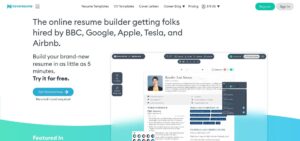
Style options stay adaptable; you can swap color accents, reorder sections, or add icons. Novorésumé also offers 16+ matching professional cover letters so the branding remains seamless when a recruiter views both documents. If any visual tweak risks hurting machine readability, the editor raises a red ATS warning so you can fix it before export.
The built-in Content Analyzer scans a pasted job description, flags missing keywords or weak verbs, and suggests quantified rewrites in real time.
Transparent, pay-once pricing also sets Novorésumé apart: $21.99 for one month, $39.99 for a quarter, or $139.99 for a full year, each with a 14-day refund window and no auto-renewal. During the paid window you can download unlimited PDF or DOCX files, then keep editing in free mode afterward.
The platform is headquartered in Denmark and operates under GDPR, and you can delete every stored file with one click.
Best for: mid-career professionals who want a boardroom-ready résumé plus keyword coaching without subscription creep or ATS glitches.
2. Enhancv: creative flair without sacrificing compliance
Enhancv built its reputation on visually distinctive résumés, including pastel accents, timeline graphics, and even a “Life Philosophy” block. Each template still exports as a single, linear text layer that ATS software can read. In an in-house test, a two-column Enhancv PDF imported into Greenhouse with all headings, dates, and bullet points captured correctly.
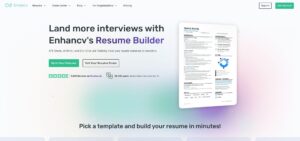
Design controls stay flexible: drag-and-drop colors, reorder sections, or add icons. An ATS Check panel, explained in Enhancv’s Pro Plans Overview, flags risky elements before you download.
The platform’s ChatGPT-4 AI Assistant scans any job description, highlights missing keywords, and rewrites individual bullets in line. It can turn “managed social posts” into metrics-rich copy in one click.
Pricing sits at the higher end: $24.99 per month, or $16.66 when paid quarterly, after a seven-day free trial that allows full template access.
Best for: marketers, designers, and brand-focused professionals who want color and personality without risking ATS misreads. The built-in AI polishing tool also helps when speed matters.
AiApply: high‑volume automation for the job hunt
AiApply positions itself as an all‑in‑one job‑search assistant. The platform lets you import your LinkedIn profile or an existing CV, then uses GPT‑4 to generate a tailored resume and cover letter in seconds. In addition to writing, AiApply provides a résumé scanner to highlight missing keywords and formatting issues, a mock interview tool and an Interview Buddy that listens during video calls and suggests talking points. A built‑in job board aggregates listings and — if you purchase credits — the Auto‑Apply system submits applications on your behalf. AiApply says more than 1.16 million job seekers have used its service and it displays a five‑star rating on its site.
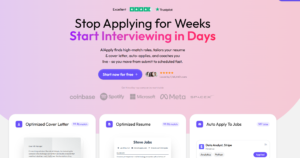
Unlike builders such as Rezi that assign scores for keyword optimisation, AiApply focuses on volume and convenience. The resume and cover letter tools pull keywords from each job description, rephrase passive sentences and reorganise experience to fit ATS formatting. You can review and edit each draft, but the goal is to generate many applications quickly. For international searches there’s a resume translator, and the Interview Buddy adds real‑time coaching. Reviews praise the clean interface and the time saved for entry‑level candidates, though community feedback notes that the auto‑apply feature sometimes submits to irrelevant jobs and that outputs can feel generic.
Pricing
- Free tier – limited to AI‑generated cover letters and resume scanning; the free plan doesn’t include full résumé access or auto‑apply.
- Pro plan – around $23–$29 per month (billed monthly) unlocks the résumé builder, cover letter generator, interview prep tools and job board access.
- Auto‑Apply credits – sold separately; roughly $39 for 100 credits or $79 for 250 credits according to reviews. Another review cites $10 for 10 credits and bulk bundles at $60 for 100 credits.
Best for: job seekers who priorities speed and volume over bespoke editing — particularly students and early‑career professionals who want to fire off many applications quickly. AiApply’s resume generator and interview tools provide a fast starting point, but the layered cost structure and mixed auto‑apply results mean more experienced applicants may prefer alternatives with clearer pricing and deeper customization.
4. FlowCV: the privacy-first builder that stays truly free
FlowCV is one of the few résumé builders that earns the label free: your first résumé costs $0 forever, with no credit card, no watermark, and unlimited PDF downloads. The site lists more than 50 single-column templates designed to satisfy ATS parsers. FlowCV reports that more than 4 million users have taken advantage of the free plan so far.
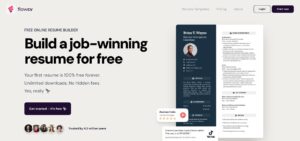
A quick field test supports that claim: uploading a FlowCV PDF to Indeed’s Quick Apply auto-filled every form field, confirming clean parsing.
Customization is straightforward. You can adjust color accents, reorder sections, or change margins while a live character counter keeps headings concise.
Privacy remains FlowCV’s headline feature. The independent, EU-based team states it never sells user data and hosts all files on GDPR-compliant servers; you can delete every document with one click.
Optional upgrades start at €6 per month or €49 per year, adding AI rewriting and room for multiple résumé versions, but many users may never need them. If you are a student, budget-watcher, or simply wary of bait-and-switch pricing, FlowCV delivers a polished, ATS-ready résumé with zero financial risk.
5. Teal: your all-in-one job-search command center
Teal brings résumé writing, job tracking, and keyword analysis into one dashboard. Save a posting with the Chrome extension, and Teal pulls the description into a card that shows a color-coded Match Score. Anything below 80 percent lights up orange and lists the missing phrases, so you can fill gaps before clicking “Apply.”
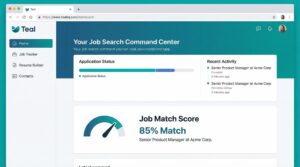
Click a bullet and choose Rewrite for this job. A GPT-4 engine adds the employer’s keywords and sharpens metrics, then stores the tailored résumé beside that job card. When a recruiter calls weeks later, the exact file is easy to find.
Templates stay intentionally plain: single column, black text, and ATS-safe headings. Design Mode lets you swap fonts or brand colors so the document still feels personal.
Pricing:
• Free plan: unlimited résumés, job tracking, and PDF exports; limited AI credits and 10 basic templates
• Teal+: $13 week, $29 month, or $79 quarter for unlimited AI, DOCX export, full template library, and advanced analytics
Best for: high-volume applicants juggling dozens of roles. Teal’s kanban board feels like moving from sticky notes to project management software: organized, searchable, and synced with every résumé you send.
6. Kickresume:student-friendly templates powered by GPT-4
Kickresume turns your browser into a mini career center: more than 40 premium templates, 1,500 real résumé examples, and a GPT-4 writer that can turn rough notes into quantified, keyword-rich bullets.
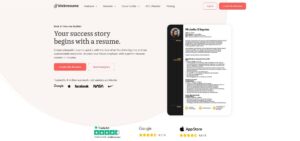
Workflow is fast. Pick a template, import your LinkedIn profile, and watch each section auto-populate. Highlight a bland line—“Helped with marketing tasks”—click Rewrite, and the AI might return “Drove a TikTok series that boosted followers 38 percent in eight weeks,” keeping metrics intact.
Design balances color and compliance. Subtle bands and icons add personality, yet every export is a single-column PDF; three test files parsed cleanly in Workday’s preview. The same content can also become a one-page personal website; seven site themes come with Premium through a single Publish button.
Pricing:
• Free plan: 4 templates and limited AI credits
• Student offer: verify a .edu or ISIC/UNiDAYS account to receive six months of Premium at no cost
• Premium: $24 per month, $14 per month when paid every six months, or $10 per month when paid yearly
Best for early-career professionals who need writing guidance and eye-catching design without stretching an entry-level budget.
How to pick the right builder: quick-scan matrix and persona guide
Decision paralysis is real, so here is a two-minute shortcut. Compare the six tools across parsing reliability, AI depth, price structure, and one standout perk. Then read the persona notes below the table to see which row matches your workflow.
| Tool | Ideal user | ATS-friendly | Signature AI feature | Free plan | Core paid price* | Notable perk |
| Novorésumé | Mid-career pros seeking boardroom polish | ✔ Tested in Workday and Lever | Real-time Content Analyzer | 1-page PDF | $21.99 for 1-month pass | Matching cover-letter builder |
| Enhancv | Creatives or marketers who need flair | ✔ Color-safe templates | GPT-4 rewrite and JD scan | 7-day full-access trial | $24.99 per month (or $16.66 per month billed quarterly) | Timeline and “Life Philosophy” sections |
| Rezi | Engineers, analysts, consultants | ✔ Best keyword-match score | Rezi Score with live gap list | 1 résumé and scans | $29 per month or $149 lifetime | Unlimited résumé versions |
| FlowCV | Students and privacy hawks on tight budgets | ✔ Single-column text | AI add-ons in Pro tier | 1 résumé, forever | €6 per month or €49 per year** | GDPR “wipe” button, no data sales |
| Teal | High-volume applicants tracking dozens of roles | ✔ Plain DOCX/PDF output | Job-Match Score tied to tracker | Unlimited jobs and PDFs | $29 per month or $13 per week | Kanban job-search dashboard |
| Kickresume | Early-career seekers needing writing help | ✔ Workday-safe PDFs | GPT-4 bullet generator and 1,500 examples | 4 templates and limited AI | $24 per month or $10 per month billed yearly | One-click personal website |
*Prices checked December 2025.
**FlowCV lists prices in euros; USD equivalent fluctuates.
Match yourself to a persona
- Design-Conscious Professional
Need a résumé that looks modern yet passes parsing tests? Enhancv offers colorful templates with built-in ATS checks, while Novorésumé provides a conservative single-column layout and real-time content feedback. - Data Optimizer
You treat job hunting like A/B testing. Rezi’s live Rezi Score shows keyword alignment in percentages, and Teal keeps every 90 percent-plus version linked to the job card for fast recall. - Budget-Savvy Grad
Funds are limited, standards are not. FlowCV delivers a zero-cost, watermark-free PDF; verify a .edu email in Kickresume and receive six months of Premium with unlimited GPT-4 rewrites at no cost. - Application Multitasker
Tracking 20 or more roles at once? Teal’s kanban board, weekly reminders, and unlimited résumé variants on Teal+ replace spreadsheets and sticky notes with one searchable workspace.
Scan, pick, and move on. The bots will not wait.
Bottom line
All six builders create ATS-safe files. Choose the one that fits how you work, whether you favor design flair, data scoring, strict budget, or high-volume tracking. Then start with its free tier or trial; a 15-minute test drive often reveals whether the interface speeds you up or slows you down.
5-step checklist for an ATS-proof, AI-assisted résumé
Treat your builder as a co-pilot. Accurate inputs and quick double-checks can mean the difference between landing an interview and receiving an algorithmic rejection.

- Run a keyword gap scan
Paste the full job description into the tool’s match feature and note every missing hard-skill phrase (for example, “stakeholder communication” appears three times). - Embed keywords in context
Mirror each high-frequency term inside an accomplishment sentence, not a standalone list. Example: Reduced cloud-hosting spend 18 percent through vendor renegotiation and proactive stakeholder communication. - Export, don’t tinker
Re-edit inside the builder instead of tweaking the PDF in Word. External edits can introduce hidden text boxes that confuse parsers. - Self-test parsing
Upload the file to Indeed or LinkedIn Easy Apply, stop before submission, and check that titles, dates, and skills land in the correct fields. If they do not, adjust section headings and re-export. - Fact-check every AI rewrite
Verify dates, metrics, and acronyms against source documents; GPT-4 can overstate results. Accuracy builds trust faster than any keyword trick.