
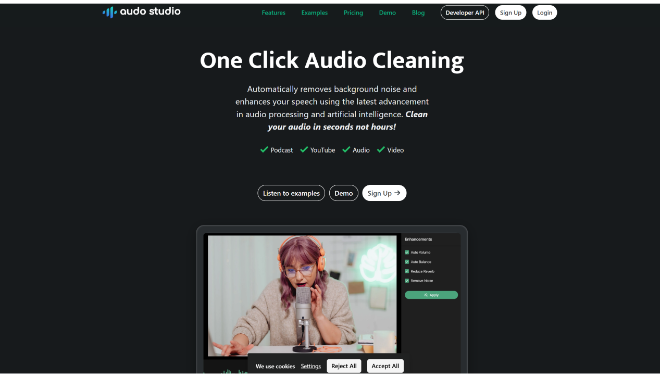


Audo Studio is a specialized, AI-driven audio enhancement tool that provides one-click audio cleaning primarily for content creators.
Introduction
For content creators, poor audio quality is the fastest way to lose an audience. Audo Studio was built on the premise that getting professional sound should be simple and automatic. It leverages sophisticated AI to analyze raw audio, intelligently separating the desired speech from unwanted noise, echo, and volume fluctuations.
Audo Studio is a key part of the broader Audo AI suite, which also includes an API for developers. The tool operates entirely in the browser, eliminating installation hassles and making it accessible across Mac, Windows, and Linux. By automating the technical process of noise reduction, dereverberation (echo reduction), and volume normalization, Audo Studio allows creators to focus entirely on their content, ensuring every recording delivers clear, consistent, and high-quality speech.
Audio Enhancement
Noise Cancellation
One-Click Magic
Browser-Based
Review
Audo Studio is a specialized, AI-driven audio enhancement tool that provides one-click audio cleaning primarily for content creators. It utilizes advanced AI algorithms to solve the most common audio problems, background noise, uneven volume, and room echo, without requiring users to master complex Digital Audio Workstations (DAWs) like Audacity or Adobe Audition.
The platform is praised for its superior noise cancellation technology, which effectively targets non-stationary noises (like barking dogs or traffic) that traditional filters often miss. Its straightforward, browser-based interface makes it exceptionally beginner-friendly. While it lacks the deep, granular editing features of professional software and has limited free usage, Audo Studio is an invaluable time-saver for podcasters, YouTubers, and online educators who prioritize fast, professional-sounding results over manual, multi-layered editing.
Features
Advanced Noise Removal
Uses state-of-the-art AI technology to automatically detect and eliminate a wide range of background noises, including traffic, fans, music, and static.
Auto Volume Adjustment
Auto Volume Adjustment: Automatically normalizes and balances the volume levels of the speech track, ensuring a consistent and pleasant listening experience across the entire recording.
Dereverberation (Echo Reduction)
An upcoming/new feature designed to automatically reduce room echo or reverberation, making recordings sound clearer and more professional.
One-Click Processing
Simplifies audio enhancement into a single step: upload the file and click the "Enhance" button for rapid, automated results.
Cross-Platform Compatibility
Accessible entirely through a web browser, ensuring full functionality on Windows, Mac, and Linux systems without the need for downloads.
Video File Support
Accepts both audio (MP3, WAV) and video files (MP4, MOV), allowing content creators to clean up the audio track directly from their video uploads.
Best Suited for
Podcasters
To instantly remove background hum, street noise, or mic distortion from interview segments and solo recordings.
YouTubers & Video Creators
Ideal for cleaning up audio from videos recorded with less-than-ideal microphones or in noisy environments.
Online Course Creators & Educators
To ensure all lecture and voiceover audio is consistently clear and easy to understand for students.
Journalists & Interviewers
For quickly enhancing the clarity of phone calls, remote interviews, and field recordings.
Developers (via Audo API)
To integrate real-time noise cancellation into live communication apps or transcription services.
Beginners in Audio
Users with no prior knowledge of audio editing who need professional results quickly and easily.
Strengths
Ease and Speed
Superior Noise Cancellation
Accessibility
Affordable Entry
Weakness
Limited Free Usage
No Manual Editing
Getting Started with Audo Studio: Step by Step Guide
Getting started with Audo Studio is a simple two-step process to clean your audio.
Step 1: Upload Your Audio or Video File
Go to the Audo Studio website and sign up for the Free Starter plan. Upload your audio (MP3, WAV) or video (MP4, MOV) file to the browser interface.
Step 2: Select Enhancement and Process
Select the desired enhancement options (e.g., Reduce background noise, Auto volume). Use the intensity slider to control the level of noise reduction if available.
Step 3: Wait for AI Processing
Audo’s AI will automatically process the file. This typically takes only a few seconds, depending on the file length.
Step 4: Preview and Fine-Tune (Optional)
Preview the enhanced audio track. If necessary, you can adjust the settings (if controls are available) or re-run the process.
Step 5: Download the Clean Audio
Once satisfied, download the professionally cleaned and volume-normalized audio file for use in your final project.
Frequently Asked Questions
Q: Is Audo Studio better than Adobe Audition?
A: Audo Studio is often praised for being faster and easier than Adobe’s traditional tools, delivering comparable or better noise removal quality with a single click, though it lacks Audition’s depth of manual editing features.
Q: What type of files can I upload?
A: Audo Studio supports uploading both common audio files (like MP3 and WAV) and popular video files (like MP4 and MOV) to process the audio track embedded within them.
Q: How long does the processing take?
A: Processing is extremely fast. For shorter files, enhancement is typically completed in seconds, making it roughly 10x faster than manually processing files in a traditional DAW.
Pricing
Audo Studio offers flexible options based on usage, including a free plan, a subscription, and a one-time purchase option.
Starter
$0 (Free Forever)
20 Minutes | Noise Removal, Dereverberation, Auto Volume |
Creator
$12/month
600 Minutes | All features, Priority Processing |
Pay As You Go
$20 (One-Time Payment)
600 Minutes | One-time minute purchase (no subscription) |
Enterprise
Custom Pricing
Custom | Tailored volume, Custom payment methods |
Alternatives
Adobe Podcast (Enhance Speech)
A powerful, free browser-based tool from Adobe that offers excellent, professional-studio-quality noise and echo removal for speech audio.
Descript (Studio Sound)
A comprehensive video/podcast editor that includes "Studio Sound," an AI feature that transforms raw audio into high-quality studio sound.
Krisp
Primarily known as a noise-cancellation app for live communication (meetings, calls), offering real-time filtering of background noise for both speaker and listener.
Share it on social media:
Questions and answers of the customers
There are no questions yet. Be the first to ask a question about this product.
