
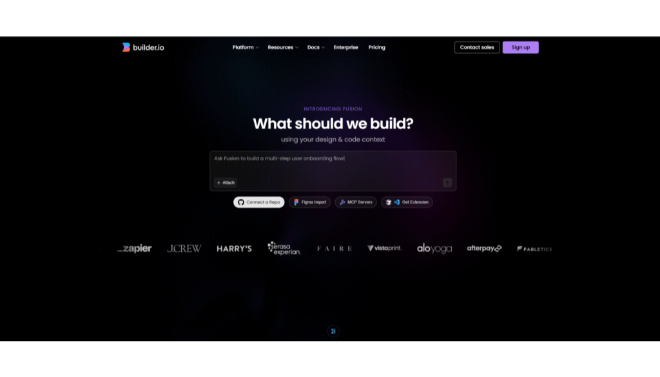






Builder.io Fusion is an AI-powered design-to-code platform created to eliminate the traditional “handoff” friction between designers and developers.
Introduction
For years, the gap between a design in Figma and a live feature in production has been a source of significant delay and technical debt. Builder.io Fusion was developed to bridge this gap, serving as a unified layer where design and code coexist. It is an AI-native platform that transforms the way digital products are built, allowing teams to ship faster by automating the tedious parts of frontend development. By acting as a “translation layer” that understands both visual design logic and complex coding structures, Fusion enables developers to focus on core functionality while the AI handles the UI implementation. For businesses operating in fast-paced markets, Builder.io Fusion offers the agility to iterate on user experiences in real-time, ensuring that the final product matches the designer’s vision with pixel-perfect accuracy.
Design-to-Code
Design System Sync
Headless CMS
AI-Native Workflow
Review
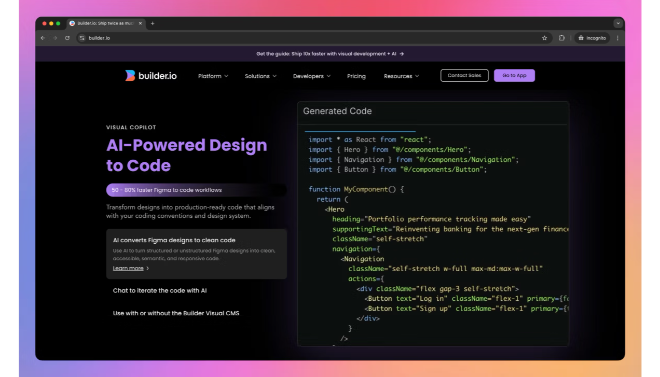
Builder.io Fusion is a sophisticated AI-powered design-to-code orchestration platform created to eliminate the traditional “handoff” friction between designers and developers. Unlike simple plugins that generate messy, unusable code, Fusion utilizes a specialized AI engine to map Figma designs directly into high-quality, production-ready components. It is engineered to understand a company’s existing design system, ensuring that any generated code respects established styling tokens, naming conventions, and component hierarchies.
The platform stands out for its Visual Development Environment, which allows non-technical users to build and deploy digital experiences, like landing pages or product sections, directly into existing codebases without a developer’s manual intervention. Recently updated with enhanced support for React, Vue, and Svelte, Fusion is becoming the industry standard for “Headless” CMS workflows. While the enterprise-level pricing is geared toward mid-to-large organizations, its ability to reduce development cycles by up to 80% makes it a high-ROI tool for modern product teams.
Features
Figma-to-Code Automation
Instantly converts Figma layers into clean, responsive code (React, Vue, Qwik, etc.) that follows best practices.
Design System Mapping
Learns and adopts your specific design tokens, colors, and components to ensure brand consistency across all generated code.
Visual CMS Integration
Allows marketing teams to edit live site content visually, with changes syncing directly to the production codebase via API.
AI Code Refactoring
Automatically cleans up "spaghetti code" from design exports, organizing them into reusable, modular components.
Cross-Framework Support
Generates code for a wide variety of stacks, including Next.js, Remix, Shopify, and standard HTML/CSS.
Real-Time Collaboration
Provides a shared workspace where designers and developers can review code and visual changes simultaneously.
Best Suited for
Frontend Developers
Automating the repetitive work of building UI components and landing pages from design mockups.
Product Designers
Ensuring their designs are implemented exactly as intended without losing quality during the developer handoff.
Marketing Teams
Gaining the ability to publish and update high-quality web pages without waiting for developer sprints.
E-commerce Brands
Rapidly iterating on storefronts and promotional banners within headless environments like Shopify or BigCommerce.
Enterprise Design Teams
Managing complex, multi-platform design systems and ensuring every team uses the same verified components.
Startups
Scaling their product development speed by leveraging AI to handle the bulk of the frontend construction.
Strengths
Production-Ready Output
Deep Integrations
Massive Time Savings
Visual Agility
Weakness
Steep Enterprise Pricing
Learning Curve
Getting Started with Builder.io Fusion: Step-by-Step Guide
Step 1: Connect Your Design Tool
Install the Builder.io plugin in Figma and connect it to your Builder account to start importing your visual assets.
Step 2: Map Your Design System
Define your company’s design tokens (colors, spacing, typography) within the Builder dashboard so the AI knows which styles to apply.
Step 3: Export Design to Code
Select a component in Figma and use the plugin to “Send to Builder.” Watch as the AI converts the visual layers into a responsive code structure.
Step 4: Refine in the Visual Editor
Use the Builder.io web interface to fine-tune the layout, add animations, or connect the component to real-time data sources.
Step 5: Publish to Your Tech Stack
Use the provided SDKs to pull the new component into your React or Vue project. Any future visual updates in Builder will reflect live on your site.
Frequently Asked Questions
Q: Is Builder.io Fusion a CMS?
A: It acts as a Visual Headless CMS, meaning it provides the visual editing power of a site builder but sends the data to your own custom-coded application.
Q: Do I need to know how to code to use Fusion?
A: For the setup and integration, a developer is required. However, once integrated, marketing and design teams can build and publish pages without writing code.
Q: What frameworks does Fusion support?
A: It supports almost all modern frameworks, including React, Next.js, Vue, Nuxt, Qwik, Svelte, and Solid.js.
Pricing
Builder.io offers a tiered model that ranges from free personal use to full-scale enterprise automation.
Basic
$0.00
1 user, limited content entries, standard Figma-to-code.
Growth
$450/month
3 users, AI-powered design system mapping, high-speed API access.
Business
$500/month
10 users, advanced roles, multi-environment support, priority support.
Alternatives
Anima
A popular Figma plugin that focuses on creating high-fidelity prototypes and React/HTML code from designs.
Locofy.ai
An AI-heavy competitor that specializes in turning designs into production-ready frontend code with a focus on mobile and web.
Webflow
A powerful visual site builder that generates its own hosting environment, ideal for those who don't need to integrate with an existing codebase.
Share it on social media:
Questions and answers of the customers
There are no questions yet. Be the first to ask a question about this product.
