

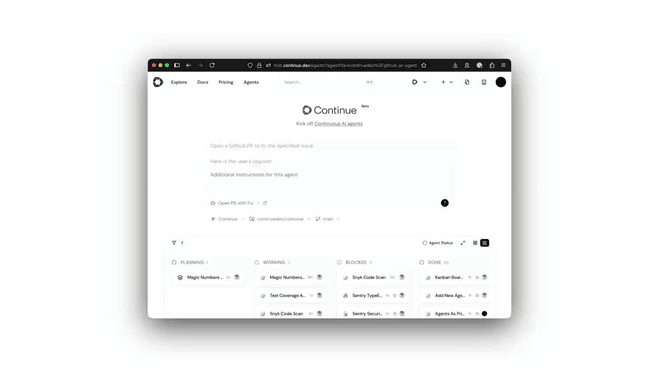
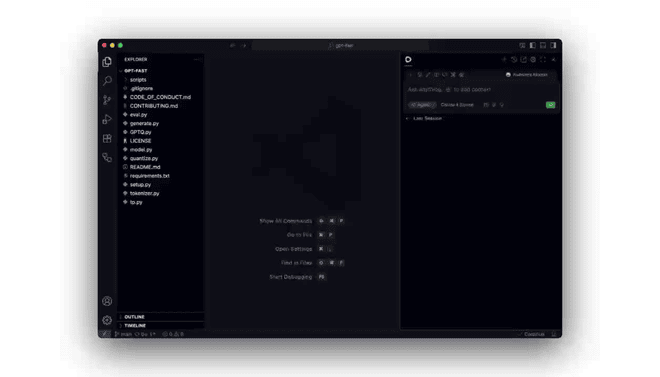



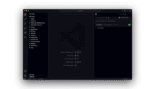

Continue is a leading open-source AI coding assistant that integrates directly into Visual Studio Code and JetBrains IDEs.
Introduction
Continue is a leading open-source AI coding assistant that integrates directly into Visual Studio Code and JetBrains IDEs.
Unlike proprietary tools that lock users into a specific model ecosystem, Continue is designed to be model-agnostic, allowing developers to connect any Large Language Model (LLM) whether it’s a commercial model like GPT-4o and Claude 3.5 Sonnet, or a local model running via Ollama.
Its mission is to give developers full control over their AI tooling, enabling privacy-first coding assistance, custom context awareness, and the ability to build “agentic” workflows without sending sensitive code to a third-party cloud.It acts as a flexible “autopilot” that sits in the IDE sidebar, offering chat, autocomplete, and inline editing capabilities.
Open Source
Model Agnostic
Privacy-First
Context Providers
Cross-IDE
Review
Continue earns an excellent expert grade of 9.3/10 for its flexibility and open-source transparency. Its primary strength is its “Bring Your Own Model” (BYOK) architecture, which allows developers to switch between the smartest cloud models for complex reasoning and fast local models for cost-free, private autocomplete.
This solves the data privacy concerns that block many enterprises from using tools like GitHub Copilot. While the setup requires slightly more configuration than “plug-and-play” alternatives and it lacks a dedicated standalone IDE (like Cursor), its deep integration into VS Code and JetBrains, combined with its robust context providers, makes it the definitive choice for developers who demand control, privacy, and customization in their AI workflow.
Features
Chat Sidebar (Cmd+L)
A conversational interface to ask questions, generate code, and debug errors, with support for multi-turn conversations.
Inline Edit (Cmd+I)
Allows users to highlight code and instruct the AI to refactor or modify it directly in the file, showing a "diff" view before accepting.
Context Providers (@)
Users can type @ to reference specific context sources, such as @Docs (to index documentation), @Git (diffs), @Terminal, or @Codebase.
Tab Autocomplete
Provides ghost-text code completion as you type. Users can configure a separate, faster model (like StarCoder or DeepSeek) specifically for this latency-sensitive task.
Model Configuration (config.json)
Highly configurable setup allowing users to define different models for Chat, Autocomplete, and Embeddings.
Docs Indexing
Allows users to paste a URL for a documentation site (e.g., React docs), which Continue indexes locally to provide accurate, up-to-date answers.
Best Suited for
Privacy-Conscious Enterprises
Ideal for companies with strict data policies that forbid sending code to public AI clouds (can run entirely on-prem).
Power Users & Tinkers
Perfect for developers who want to experiment with the latest models (e.g., DeepSeek, Llama 3) immediately upon release.
Full-Stack Developers
Excellent for switching contexts between frontend and backend by using @codebase to index the full project.
Teams using JetBrains
A strong alternative to GitHub Copilot for users who prefer the JetBrains ecosystem over VS Code.
DevOps Engineers
Useful for troubleshooting terminal errors by piping terminal output directly into the AI chat context.
Local AI Enthusiasts
The best-in-class tool for running coding assistants locally using Ollama or LM Studio without internet dependency.
Strengths
Model-agnostic design lets you use the absolute best LLM for every specific task.
Supports fully local offline workflow.
Custom Context Providers (like @Docs) allow for highly specific, grounded answers.
The core tool is free, allowing developers to pay only for the exact tokens.
Weakness
Local model performance depends entirely on the user’s hardware.
No built-in “free tier” model.
Getting started with: step by step guide
The Continue workflow emphasizes selecting the right model for the job and feeding it the right context.
Step 1: Install & Config
Go to the Midjourney website and click “Join the Discord.” Because Midjourney runs from Discord, you will need to have an account.
Step 2: Select Model
The user installs the extension and modifies config.json to add their API keys (e.g., OpenAI, Anthropic) or local provider.
Step 3: Chat & Query
The user asks a question. To improve accuracy, they type @Codebase to let the AI scan the project files for relevant context.
Step 4: Inline Edit
The user highlights a function, presses Cmd+I, and types “Add error handling to this request.” The AI rewrites the code in place.
Step 5: Autocomplete
As the user types, a lightweight model (configured separately) provides instant gray-text suggestions, accepted via Tab.
Step 6: Debug Terminal
If a build fails, the user types @Terminal in the chat to feed the error log to the LLM for an instant explanation and fix.
Frequently Asked Questions
Q: Is Continue completely free?
A: The extension software is free and open-source. However, you must pay for the API usage of the models you connect (e.g., paying OpenAI for GPT-4 tokens), unless you use free local models.
Q: Can I use Continue offline?
A: Yes. By connecting Continue to a local inference server like Ollama or LM Studio, you can run LLMs entirely on your machine without an internet connection.
Q: Does Continue work in JetBrains IDEs (IntelliJ, PyCharm)?
A: Yes, Continue has a dedicated plugin for the JetBrains suite, offering feature parity with the VS Code version.
Q: How does the @Docs feature work?
A: You provide a URL to a documentation site. Continue crawls and indexes that site locally, allowing the AI to answer questions based on that specific documentation (e.g., “How do I use the new feature in Next.js 14?”).
Q: Is my code sent to Continue's servers?
A: No. Continue is designed so that code goes directly from your IDE to the LLM provider (e.g., OpenAI) or your local server. It does not pass through a Continue proxy server unless you are on the Enterprise plan using a custom proxy.
Q: Can I use different models for chat and autocomplete?
A: Yes, this is a recommended best practice. You can configure a smart, expensive model (like GPT-4o) for Chat and a small, fast model (like DeepSeek Coder or StarCoder) for Autocomplete in the config file.
Q: How does it compare to Cursor?
A: Cursor is a separate IDE (a modified VS Code) with deeper native integrations. Continue is an extension that works inside your existing VS Code or JetBrains setup. Continue offers more model flexibility; Cursor offers a smoother UI experience.
Q: What is "Tab Autocomplete"?
A: It is the “ghost text” that appears in gray as you type. Continue suggests the next few lines of code based on the surrounding context, which you can accept by pressing the Tab key.
Q: Does it support enterprise SSO?
A: Yes, the Team and Enterprise tiers offer features like Single Sign-On (SSO) and centralized configuration management for large organizations.
Q: Can I add my own custom slash commands?
A: Yes, you can define custom Slash Commands (e.g., /test, /refactor) in the configuration file to run specific prompts or scripts.
Pricing
Continue operates on a free and open-source model for the core extension. Individuals can use the tool for free, paying only for their own API usage (if using cloud models) or paying nothing (if using local models). A paid Team tier exists for organizations needing centralized configuration and secret management.
Basic
$0/month
Full extension access, Local Model support, Custom Context Providers, VS Code/JetBrains support.
Standard
$10/month
Centralized Configuration, Shared Prompts/Docs, Secret Management (API Keys), Usage Analytics.
Pro
Custom
SSO, Audit Logs, On-premise deployment, Priority Support, Custom Legal Agreements.
Alternatives
GitHub Copilot
The market leader; offers a smoother "out-of-the-box" experience but locks users into OpenAI models and has less transparent data privacy controls.
Cursor AI
A full IDE (VS Code fork) rather than an extension; offers deeper native integration and "Agent" capabilities but requires switching editors.
Tabnine
A strong competitor for enterprise privacy, offering compliant, private code completion models.
Share it on social media:
Questions and answers of the customers
There are no questions yet. Be the first to ask a question about this product.

Continue AI
Sale Has Ended