
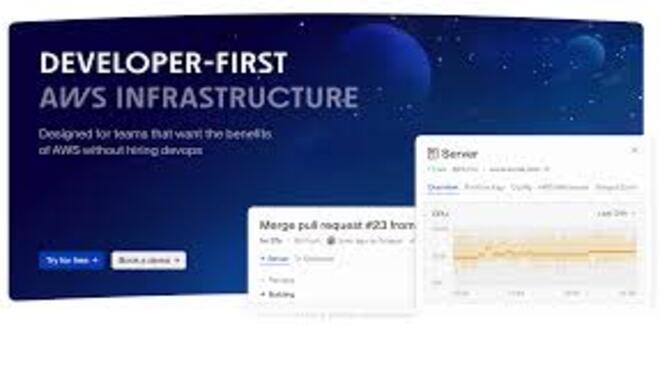





Flightcontrol is a powerful Deployment and Infrastructure-as-Code (IaC) platform designed to provide a high-level, “PaaS-like” developer experience (similar to Vercel or Heroku) but directly on a user’s own AWS account.
Introduction
Flightcontrol is a powerful Deployment and Infrastructure-as-Code (IaC) platform designed to provide a high-level, “PaaS-like” developer experience (similar to Vercel or Heroku) but directly on a user’s own AWS account.
Its core mission is to bridge the gap between ease of use and infrastructure control. By automating the setup of ECS, Fargate, RDS, and S3, Flightcontrol allows developers to deploy full-stack applications (Node.js, Python, Go, Rust, etc.) without becoming AWS experts.
Recently, Flightcontrol has integrated AI-assisted infrastructure generation, allowing users to describe their needs in plain English and have the platform generate the necessary configurations and troubleshoot deployment failures automatically.
AWS Native
AI Configurator
Zero-Downtime
Security First
Developer Focused
Review
Flightcontrol is known for its flawless execution of the “Bring Your Own Cloud” (BYOC) model. Its primary strength is providing a seamless, automated deployment pipeline while allowing users to retain 100% ownership of their AWS resources and data. The AI-assisted configuration is a major benefit, significantly lowering the barrier to entry for complex AWS setups.
While users still pay for their underlying AWS costs and the platform requires an initial AWS connection, its ability to offer Vercel-level simplicity for backend and database services on private infrastructure makes it an essential tool for scaling startups and security-conscious engineering teams.
Features
AI Deployment Assistant
Describe your app (e.g., "I need a Next.js app with a Postgres DB and a Redis cache") and the AI generates the deployment blueprint.
Infrastructure-as-Code (IaC) Generation
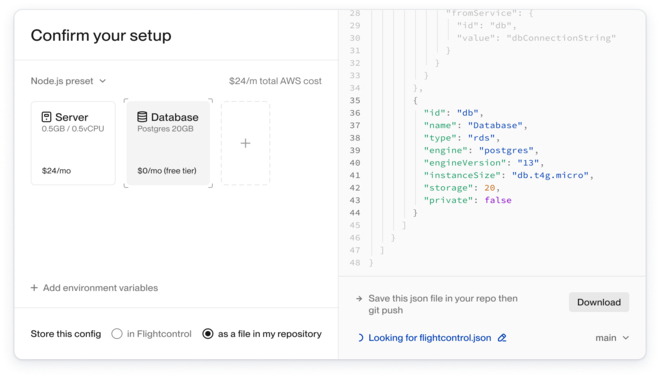
Automatically generates and manages the underlying AWS resources via an easy-to-read configuration file.
Preview Environments
Automatically spins up a fresh environment for every Pull Request, allowing for "live" testing of features before merging.
Custom Domain & SSL
Automates the acquisition and renewal of SSL certificates via AWS Certificate Manager.
Environment Variable Management
Securely handles secrets and variables across different stages (Dev, Staging, Production).
Managed RDS & Redis
Simplifies the complex process of setting up, scaling, and backing up AWS databases.
Best Suited for
Full-Stack Developers
Ideal for those who want a PaaS experience but need the power and cost-efficiency of AWS.
CTOs at Startups
Perfect for teams that need to scale fast without hiring a dedicated DevOps engineer early on.
SaaS Founders
Excellent for maintaining control over user data by keeping it within a private AWS perimeter.
Open Source Projects
Great for deploying self-hosted software with a professional, automated pipeline.
Security-Conscious Teams
Useful for organizations with strict compliance requirements that prevent using multi-tenant PaaS providers.
Next.js & Remix Users
A strong alternative to Vercel for those who want to run their SSR apps on their own cloud.
Strengths
You own your infrastructure; if you stop using Flightcontrol, your apps and data still exist in your AWS account.
Vercel-like developer experience for the backend
Significantly cheaper than a PaaS at scale
AI-powered troubleshooting helps identify and fix deployment errors
Weakness
Initial AWS setup requires specific permissions and IAM roles
The ecosystem is focused primarily on AWS; it does not currently support GCP or Azure for cross-cloud deployments.
Getting started with: step by step guide
The Flightcontrol workflow is designed to be “Git-driven,” where the repository is the source of truth for the infrastructure.
Step 1: Connect AWS
The user links their AWS account to Flightcontrol via a secure IAM role.
Step 2: Connect GitHub
The user selects the repository they want to deploy.
Step 3: AI Config
The user uses the AI Assistant or a wizard to define the services (e.g., “Web Service,” “Database,” “Worker”).
Step 4:Environment Setup
Flightcontrol generates the flightcontrol.json file and initiates the first build on AWS.
Step 5: Git Push
Every time the developer pushes to the main branch, Flightcontrol triggers a new zero-downtime deployment.
Step 6: Monitor & Scale
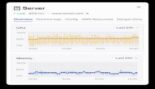
The user monitors logs and performance in the Flightcontrol dashboard, using the AI to suggest scaling or configuration tweaks.
Frequently Asked Questions
Q: Is Flightcontrol a Cloud Provider?
A: No. It is an orchestration layer. It sits on top of AWS and manages your resources for you.
Q: What happens if I stop paying for Flightcontrol?
A: Your apps stay running on AWS. Because Flightcontrol deploys to your account, you keep your resources, though you lose the automated deployment and management features.
Q: Do I need to know AWS to use it?
A: No. Flightcontrol is designed so you never have to log into the AWS Console. However, some basic understanding of AWS billing is helpful.
Q: Can it deploy to GCP or Azure?
A: No, Flightcontrol is exclusively focused on AWS to provide the deepest and most stable integration possible.
Q: How does the AI feature work?
A: You can chat with the dashboard to create new services or fix errors. For example: “Upgrade my database to a larger instance” or “Why did my last build fail?”
Q: Is it secure?
A: Yes. Flightcontrol uses the Principle of Least Privilege for IAM roles and never sees your actual user data; it only manages the infrastructure.
Q: Does it support Docker?
A: Yes. Any application that can be Dockerized can be deployed via Flightcontrol. It also supports “Nixpacks” to automatically build apps without a Dockerfile.
Q: Can I use my own VPC?
A: Yes, the Team and Enterprise plans allow for deep networking customization, including using existing VPCs.
Q: Does it support Serverless?
A: While its primary focus is on Fargate (Containers), it provides a “Serverless-like” experience with auto-scaling and managed services.
: How is this cheaper than Vercel?
A: PaaS providers like Vercel charge a premium for bandwidth and compute. By using AWS raw pricing, you can save 50-80% on infrastructure costs as your traffic grows.
Pricing
Flightcontrol operates on a subscription model based on the number of services and developers. Users pay Flightcontrol for the orchestration and management, while separately paying AWS for the actual compute and storage resources used.
Basic
$97/month
Unlimited Projects, Priority builds, Standard support, Full AI assistance.
Standard
$397/month
Shared Workspaces, RBAC, Advanced Networking (VPC), Priority Support.
Pro
custom
Dedicated infrastructure, Custom security compliance, White-glove onboarding.
Alternatives
Coolify
An open-source, self-hosted alternative for managing your own servers, though with less managed AWS "magic."
Pulumi / Terraform
The standard tools for IaC, but they require writing complex code and manual management of pipelines.
Render
A modern PaaS that is easier than AWS but lacks the "Own your cloud" benefit of Flightcontrol.
Share it on social media:
Questions and answers of the customers
There are no questions yet. Be the first to ask a question about this product.

Flightcontrol
Sale Ends In: