
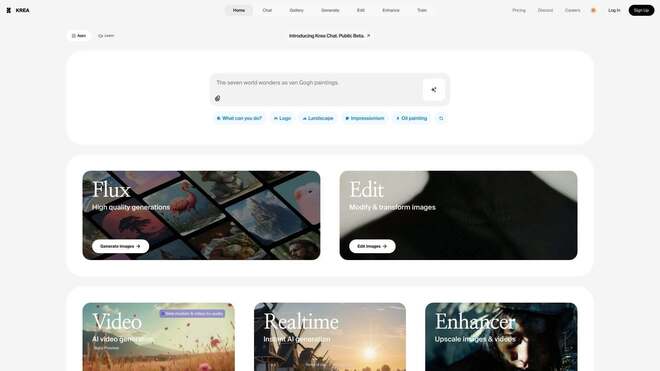


Krea AI is a high-performance real-time generative design and image enhancement platform built for visual artists, designers, and content creators.
Introduction
Krea AI is a high-performance real-time generative design and image enhancement platform built for visual artists, designers, and content creators.
Utilizing advanced Latent Consistency Models (LCM), Krea’s standout feature is its “Real-time Canvas,” which allows users to generate and manipulate images with sub-second latency essentially allowing the AI to “paint” alongside the user as they move shapes or draw strokes.
Beyond generation, Krea offers a world-class AI Enhancer and Upscaler that breathes cinematic detail into low-resolution images. Its mission is to collapse the gap between imagination and execution, providing a fluid, interactive workspace where AI acts as a digital extension of the artist’s hand.
Real-time Generation
AI Enhancer
Screen-to-Image
Pattern Training
Creative Camera
Review
Krea AI is known for its revolutionary real-time workflow and superior upscaling quality. Its primary strength is the low-latency feedback loop, which transforms AI from a “prompt-and-wait” tool into a live creative instrument.
The AI Enhancer is arguably the best in its class, often outperforming dedicated software in its ability to reconstruct textures and lighting. While the video generation tools are still evolving and high-end features require a subscription, its intuitive UI and “Screen-to-Image” capability make it an essential powerhouse for any modern visual production pipeline.
Best Suited For
Concept Artists
Ideal for rapidly iterating on environment layouts and lighting using the Real-time Canvas.
Graphic Designers
Perfect for upscaling low-res client assets into high-fidelity, print-ready graphics.
Architects
Excellent for "sketch-to-render" workflows where simple blocky shapes are turned into photorealistic buildings.
Product Designers
Great for experimenting with materials and product finishes on top of basic 3D renders.
Social Media Managers
Useful for creating high-impact, surreal visuals and "pattern-based" brand art (hidden logos).
Fashion Designers
A strong tool for visualizing fabric textures and garment silhouettes in real-time.
Key Features
Real-time Canvas
A digital drawing board where basic shapes and brushstrokes are instantly converted into detailed AI imagery.
AI Enhancer & Upscaler
Uses "Generative Refinement" to add realistic skin textures, fabric weaves, and lighting to blurry photos.
Screen-to-Image
An app-wide feature that allows you to point Krea at a 3D software (like Blender) or a browser and apply AI styles to the output live.
Community Gallery
A curated feed of prompts and styles that users can "remix" instantly into their own workspace.
Logo/Pattern Styles
A specialized tool that hides text or logos within complex AI-generated landscapes or textures.
AnimateDiff Video
Generates high-quality, motion-stable video clips from text prompts or existing images.
Strengths
Instantaneous feedback loop allows for a “trial and error” creative process
The Enhancer is industry-leading, capable of saving “unusable” low-res photos with convincing detail
Screen-to-Image is a game-changer for 3D artists
Clean, distraction-free UI
Weakness
Requires high-speed internet; since the heavy processing is cloud-based, any lag in connection ruins the real-time feel.
Video tools are less mature
Getting started with: step by step guide
The Krea workflow is highly visual, encouraging users to move elements around to find the perfect composition.
Step 1: Select Workspace
The user chooses between the Real-time Canvas, Enhancer, or Video tools.
Step 2: Setup Input
In the Canvas, the user places simple shapes or uploads a “base” image.
Step 3: Prompt & Style
The user types a prompt (e.g., “Cyberpunk city, neon rain”) and selects a style preset (e.g., “Cinematic”).
Step 4: Live Manipulation
The user moves the shapes on the left side of the screen while watching the AI-generated result on the right update instantly.
Step 5: Enhance
Once a composition is found, the user sends the image to the AI Enhancer to add high-frequency detail and upscale to 4K.
Step 6: Download/Export
The user saves the final high-resolution asset or continues to iterate by changing the “AI Strength” slider.
Frequently Asked Questions
Q: Is Krea AI free?
A: Yes, there is a free tier with daily credits. However, faster speeds and the high-end Enhancer require a paid plan.
Q: Can I use it on my own computer?
A: No. Krea is cloud-based. All you need is a browser, but a stable internet connection is vital for the real-time features.
Q: What is "Screen-to-Image"?
A: It’s a tool that lets Krea “see” another window on your computer (like Photoshop or a game) and apply AI filters to it in real-time.
Q: Does it work with my drawing tablet?
A: Yes. Krea works perfectly with Wacom, Huion, or iPad (via browser), making the real-time canvas feel like a smart sketchbook.
Q: Do I own the images I create?
A: Yes. On paid plans, you have full commercial rights. Free users should check the latest terms for non-commercial restrictions.
Q: Can it create video?
A: Yes, it has an Animate feature that creates motion from prompts, though it is currently optimized for shorter loops.
Q: How high can it upscale?
A: It can upscale to 4K and 8K, depending on your plan, while adding significant generative detail.
Q: What is "AI Strength"?
A: It’s a slider that controls how much the AI changes your original input. Lower strength stays close to your sketch; higher strength gives the AI more freedom.
Q: Can I hide a logo in an image?
A: Yes, using the AI Patterns tool, you can upload a logo and have Krea generate a landscape where the logo is hidden in the clouds or hills.
Q: Is it safe for work (NSFW filters)?
A: Yes, Krea has strict safety filters on its public platform to prevent the generation of inappropriate or harmful content.
Pricing
Krea AI operates on a freemium, credit-based model. While the real-time canvas is accessible to many, the high-fidelity upscaler and video tools consume significant compute resources and are managed via tiered plans.
Basic
$9/month
No watermarks, Faster generation, 2 parallel runs, standard upscaling.
Standard
$21/month
Unlimited Real-time, High-res Enhancer, 8 parallel runs, private mode.
Pro
$63/month
Highest priority, commercial license, dedicated support, API access.
Alternatives
Magnific AI
The primary competitor for high-end AI upscaling; arguably more detailed but lacks the real-time generation features.
Leonardo.ai
A broad creative suite with excellent "Live Canvas" features, though with a slightly more complex interface.
Flux.1 (on Fal.ai)
A modern, fast model that competes on raw prompt adherence and speed, often used via API by professional devs.
Share it on social media:
Questions and answers of the customers
There are no questions yet. Be the first to ask a question about this product.

Krea AI
Sale Ends In: