
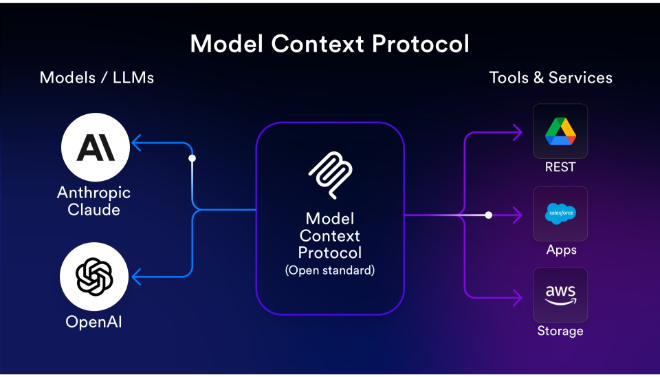


The Model Context Protocol (MCP) is a groundbreaking open-source standard introduced by Anthropic to solve the “integration tax” that plagues AI development.
Introduction
The biggest limitation of modern AI isn’t its intelligence—it’s its isolation. Most AI models are “trapped” behind a chat interface, unable to see your local files or interact with your specific business tools. MCP (Model Context Protocol) is the key that unlocks these barriers. Developed by Anthropic as an open standard, MCP provides a secure, structured way for AI models to “reach out” and interact with the data silos they previously couldn’t access. By standardizing how AI clients and data servers communicate, MCP is doing for AI what HTTP once did for the web: creating a universal language that allows different systems to work together seamlessly.
Open Source
Universal Standard
Secure Integration
Agent-Ready
Review
The Model Context Protocol (MCP) is a groundbreaking open-source standard introduced by Anthropic to solve the “integration tax” that plagues AI development. Before MCP, developers had to write custom, brittle code to connect every different AI model to every different data source (like Google Drive, Slack, or local databases). MCP replaces these one-off integrations with a universal connector, allowing AI models to securely access the data and tools they need to perform real-world tasks.
The protocol is rapidly becoming the industry standard for agentic workflows. It enables a “plug-and-play” ecosystem where a single MCP server can provide data to any compatible AI client, such as the Claude Desktop app, IDEs like Windsurf, or custom-built enterprise agents. While it is a technical tool aimed at developers, its impact is felt by end-users who suddenly find their AI assistants capable of reading their local files, querying their databases, and interacting with their professional software suite with zero manual configuration.
Features
Universal Data Connectors
Provides a standardized way to connect AI models to hundreds of data sources, including GitHub, Slack, Google Drive, and local SQL databases.
Secure Local Access
Allows AI assistants (like Claude Desktop) to securely read and interact with files on your local machine without exposing them to the open web.
Tool Calling & Execution
Enables AI models to not only read data but also take actions—such as creating a Jira ticket or sending a Slack message via standardized MCP tools.
Host-Agnostic Design
Works across different AI clients (Claude, IDEs, CLI tools) and different data providers, ensuring that an integration built once works everywhere.
Structured Metadata Support
Ensures that the AI understands the context of the data it's receiving, leading to significantly fewer hallucinations and more accurate responses.
Community-Driven Server Gallery
Access a growing library of pre-built MCP servers created by the community to instantly connect your AI to popular professional tools.
Best Suited for
Software Engineers
Connecting AI coding assistants directly to their repositories, documentation, and terminal for autonomous debugging and refactoring.
Enterprise Developers
Building custom AI agents that need to securely query internal company databases and legacy systems without building custom APIs.
Data Analysts
Empowering AI models to perform complex SQL queries and data visualizations by giving them direct, structured access to datasets.
Project Managers
Automating the synchronization of data between tools like Slack, Jira, and Notion using AI-driven agents.
AI Researchers
Testing how different models perform when given access to diverse, real-world data environments in a standardized way.
Power Users
Personalizing their AI assistants to act as a "second brain" by connecting them to their local note-taking apps and file systems.
Strengths
Eliminates Fragmentation
Massive Community Momentum
Developer-Centric DX
Security First
Weakness
Technical Entry Barrier
Client Adoption Curve
Getting Started with MCP: Step-by-Step Guide
Step 1: Download an MCP Client
Start by downloading a compatible client, such as the Claude Desktop app or an IDE like Windsurf or Cursor.
Step 2: Browse the MCP Gallery
Visit the official MCP GitHub or community galleries to find the “servers” (connectors) for the tools you use, such as Google Drive or PostgreSQL.
Step 3: Configure the Server
For Claude Desktop, you will typically edit a simple JSON configuration file to point the app to the MCP server you want to use.
Step 4: Grant Permissions
When you start a chat, the AI will ask for permission to access the connected tools. You have granular control over what the AI can see and do.
Step 5: Execute Agentic Tasks
Ask your AI to perform a task using the data, such as “Search my local documents for the 2025 budget and summarize the key findings in a table”.
Frequently Asked Questions
Q: Who created MCP?
A: MCP was created and open-sourced by Anthropic, but it is designed to be a model-agnostic standard used by the entire AI industry.
Q: Does MCP only work with Claude?
A: No. While Anthropic pioneered it, MCP is an open standard. It already works with various IDEs and is being adopted by other AI client developers.
Q: Is it safe to give an AI access to my local files via MCP?
A: Yes. MCP is designed with security in mind. You choose which servers to run, and the AI can only access data through those servers with your explicit permission.
Pricing
MCP is an open-source protocol and is free to implement and use.
Open Source
$0.00
Full access to the protocol, SDKs, and community servers.
Managed Hosting
Price Varies
Third-party providers may charge for hosting MCP servers for enterprise teams.
Alternatives
LangChain (Tools/Agents)
A popular framework for building AI apps that includes its own system for tool-calling, though it is more of a library than a universal protocol.
OpenAI Assistants API
Provides built-in tools like "Code Interpreter" and "File Search," but it is a closed system that only works within the OpenAI ecosystem.
Standardized API Gateways
Traditional ways of connecting software that require manual, per-app configuration and lack AI-specific context features.
Share it on social media:
Questions and answers of the customers
There are no questions yet. Be the first to ask a question about this product.
