

TARA is an AI-driven project management platform designed specifically for software engineering teams who find tools like Jira too bloated or manual.
Introduction
For many engineering teams, project management is the “tax” they pay to get work done. Hours are wasted manually updating tickets that quickly become outdated. TARA was built to turn project management from a manual chore into an autonomous advantage. By embedding AI directly into the workflow, TARA bridges the gap between high-level product goals and the actual code being written. It is an “intelligent tissue” that connects your Git repositories to your sprint plans, ensuring that your roadmap reflects reality, not just wishful thinking. In the high-velocity development landscape of 2026, TARA provides the clarity and automation required to ship software on time, every time, without the administrative overhead.
AI-Powered Scoping
Git-Integrated
Sprint Automation
Zero-Config Setup
Review
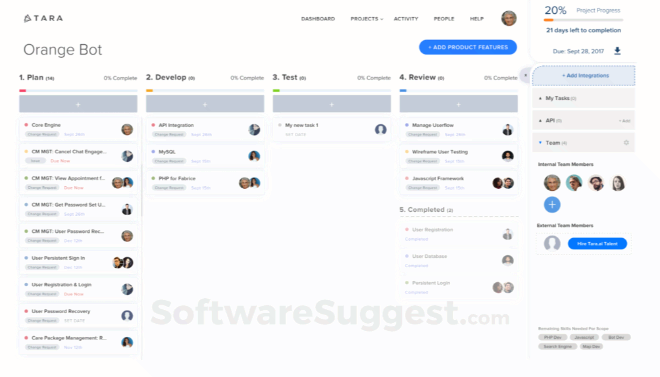
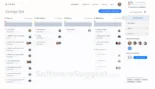
TARA is a high-performance AI-driven project management platform designed specifically for software engineering teams who find traditional tools like Jira too bloated or manual. Founded by Iba Masood and Syed Ahmed, TARA utilizes machine learning to automate the most tedious parts of the development lifecycle: scoping projects, assigning tasks, and predicting delivery timelines. Unlike static project trackers, TARA acts as an autonomous coordinator, syncing directly with GitHub, GitLab, and Slack to provide a real-time view of engineering velocity.
The platform’s standout feature is its AI Scoping Engine, which can analyze a project requirement document and automatically break it down into actionable tasks and sprints. By 2026, TARA has evolved into a “Co-pilot for Managers,” providing predictive alerts when a sprint is at risk of “scope creep” or when team burnout is imminent based on commit patterns. While it is a specialized tool for technical teams, its ability to unify “the what” (project management) with “the how” (Git activity) makes it an essential asset for startups and mid-market engineering departments aiming for peak efficiency.
Features
AI Task Scoping
Input a project description and the AI generates a structured breakdown of tasks, sub-tasks, and estimated effort.
Deep Git Integration
Bi-directional sync with GitHub and GitLab that automatically moves tasks through the workflow as PRs are opened and merged.
Predictive Sprint Insights
Analyzes historical velocity to predict if a team will meet its sprint goals, flagging potential blockers before they occur.
Unified Workspace
Combines requirements, task management, and team communication in a single, lightning-fast interface.
Unified Workspace
Provides a "Weekly Progress" view that summarizes code commits and task completions into a readable report for stakeholders.
Effortless Migration
One-click import for teams moving away from Jira, Trello, or Asana, preserving historical data and existing workflows.
Best Suited for
Fast-Growing Startups
Needing to scale their engineering processes quickly without hiring a dedicated project manager.
Agile Engineering Teams
Who want a tool that reflects their actual Git activity rather than manual status updates.
Product Managers
Needing accurate, AI-generated effort estimates to better plan roadmaps and manage stakeholder expectations.
Remote-First Companies
Utilizing TARA’s Slack and Discord integrations to keep distributed teams in sync across time zones.
CTOs & VPs of Engineering
Seeking high-level visibility into team performance and project health across multiple repositories.
Freelance Developers
Managing multiple client projects with an AI assistant that handles the overhead of task organization.
Strengths
Reality-Based Data
Minimalist & Fast
Automated Scoping
Free Tier Value
Weakness
Feature Maturity
Visual Customization
Getting Started with TARA: Step-by-Step Guide
Step 1: Connect Your Repositories
Sign up and link your GitHub or GitLab account. TARA will begin analyzing your recent activity to understand your team’s velocity.
Step 2: Scope Your First Project
Use the AI Scoping tool. Type a prompt like “Build a React-based user profile page with OAuth integration” and watch the AI generate your task list.
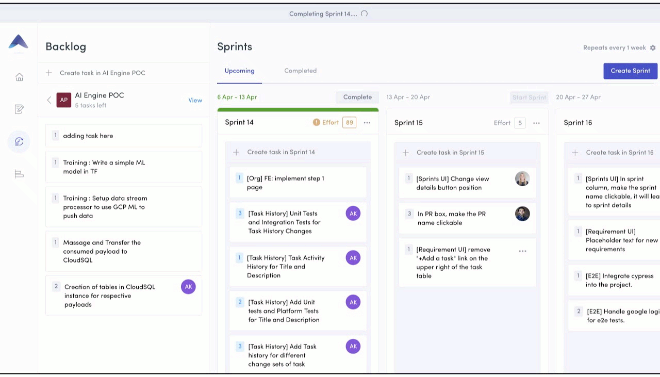
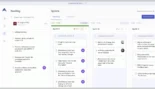
Step 3: Organize Into Sprints
Drag your AI-generated tasks into the “Current Sprint.” Assign team members and set your goal dates.
Step 4: Sync Your Workflow
As developers open PRs or push code, TARA will automatically update task statuses. No manual “moving tickets” required.
Step 5: Review AI Insights
At the end of the week, check the “Insights” tab. Review the AI’s assessment of your sprint health and adjust your next sprint’s load accordingly.
Frequently Asked Questions
Q: Does TARA replace my GitHub Issues?
A: It can! TARA can act as a management layer on top of GitHub Issues or replace them entirely, providing a more structured “Sprint” and “Roadmap” view.
Q: How does the AI "Scope" a project?
A: TARA’s AI is trained on millions of historical software tasks. It uses LLMs to interpret your requirements and predict the specific steps needed to complete them.
Q: Is TARA secure for my private code?
A: Yes. TARA only accesses the metadata (branch names, PR titles, commit messages) needed for tracking and does not store your source code.
Pricing
TARA offers straightforward, per-user pricing designed to grow with your team.
| Plan | Monthly Cost (Annual) | Key Features |
| Free | $0.00 | Unlimited tasks and projects, basic Git integration, up to 5 users. |
| Co-pilot | $10.00 / mo | AI Scoping, predictive insights, advanced Git sync, and priority support. |
| Business | Contact Sales | Custom reporting, SSO, dedicated account manager, and white-glove migration. |
Alternatives
Linear
The darling of the startup world, known for its extreme speed and keyboard-first design, though less focused on AI scoping.
Jira (Atlassian)
The industry standard for enterprise, offering unmatched customization but at the cost of high complexity and manual overhead.
Height
A highly flexible, "new-age" project management tool that emphasizes chat-like task interaction.
Share it on social media:
Questions and answers of the customers
There are no questions yet. Be the first to ask a question about this product.
