


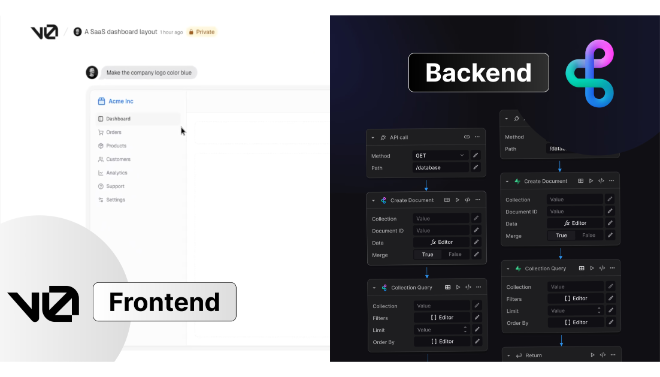





Vercel v0 is a game-changing, AI-powered UI generator designed specifically for the developer workflow.
Introduction
The initial stages of web development are often bogged down by writing boilerplate code for common UI elements like navbars, forms, and cards. Vercel v0 was created to eliminate this tedious work. It represents a paradigm shift from manually writing code to conversing with an AI agent to build the UI you need.
Vercel v0 operates as an intelligent agent within its environment. It interprets your request, generates the responsive, semantic HTML structure, styles it using modern standards (Tailwind CSS), and provides you with the raw, high-quality JSX code instantly. By focusing on generating code that developers want to work with, not proprietary formats, v0 empowers teams to validate ideas, create MVPs, and ship features faster than ever.
Prompt-to-Code
Rapid Prototyping
One-Click Magic
Browser-Based
Review
Vercel v0 is a game-changing, AI-powered UI generator designed specifically for the developer workflow. Unlike traditional no-code tools that lock you into a visual editor, v0 takes natural language prompts and instantly generates clean, production-ready React components styled with Tailwind CSS and often leveraging the shadcn/ui library.
The platform is indispensable for rapid prototyping, instantly turning design ideas (or even simple sketches/mockups) into functional code. Its unique advantage is the Developer-First philosophy: the code is modular, fully editable, and integrates seamlessly into the Vercel/Next.js ecosystem. While v0 excels at front-end scaffolding, it does not autonomously handle complex backend logic, full authentication flows, or database connections, requiring developers to connect those pieces separately. For front-end engineers, product managers, and technical founders, v0 is a crucial productivity accelerator that bridges the gap between concept and code.
Features
Prompt-to-Code Generation
Generates responsive React/JSX components and full-page layouts from simple natural language descriptions (e.g., "Create a dashboard with a sidebar and 3 data cards").
Clean Code Output
Generates clean, modular, and accessible code, typically using industry-standard libraries like shadcn/ui and styling with Tailwind CSS.
Live Code Editor & Preview
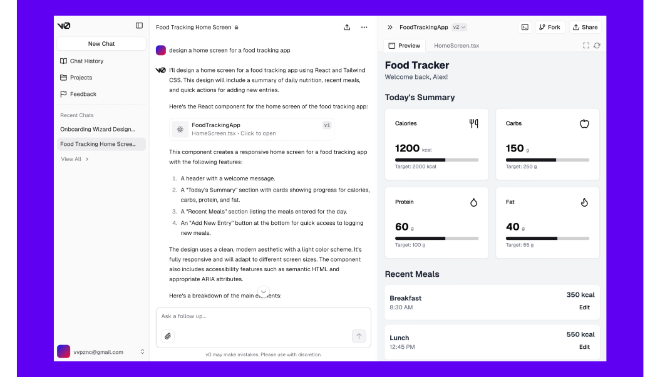
Includes a built-in environment with a code editor that shows the visual result in real-time, allowing for instant fine-tuning and iteration.
GitHub Integration
Supports syncing generated code directly with a GitHub repository, enabling version control and collaboration from within the v0 environment.
Multi-Modal Input
Ability to generate code not only from text prompts but also from visual inputs like screenshots of existing UIs or Figma designs.
Agentic Capabilities
The v0 agent can perform multi-step actions, search the web for context, and even automatically fix errors in the code it generates.
Best Suited for
Front-End Developers
To quickly scaffold UI elements, reduce boilerplate writing, and rapidly iterate on design changes.
Product Managers & Owners
Ideal for quickly visualizing new feature ideas, creating functional mockups, and communicating requirements to the engineering team.
Technical Founders & Startups
To build functional Minimum Viable Products (MVPs) and landing pages in a fraction of the time required for manual coding.
Designers
To convert high-fidelity mockups (e.g., from Figma) into production-ready React code instantly for developer handoff.
Data Scientists
For quickly creating dashboards, data visualizations, and custom UIs to present findings and analytical tools.
Engineers Learning React/Tailwind
Serves as an excellent pair programmer, providing high-quality code examples and patterns to learn from.
Strengths
Real Code, Full Control
Rapid Iteration
Modern Stack
Vercel Ecosystem
Weakness
Credit/Token Consumption
Front-End Focus Only
Getting Started with Vercel v0: Step by Step Guide
Getting started with Vercel v0 allows you to turn an idea into a component in seconds.
Step 1: Create or Log in to Vercel Account
Vercel v0 requires a Vercel account. Sign up or log in via GitHub/GitLab on the v0 website.
Step 2: Start a New Chat/Project
Initiate a new chat. This is your prompt-to-code environment where you will converse with the AI agent.
Step 3: Provide a Natural Language Prompt
Type a clear, specific description of the component or layout you want (e.g., “Create a pricing table with three tiers, a primary CTA, and feature bullet points.”).
Step 4: Review, Edit, and Iterate
Vercel v0 will generate the component. Use the chat window to refine the design (e.g., “Change the primary color to green and make the buttons full width on mobile.”) or manually edit the code in the integrated editor.
Step 5: Export and Deploy
Click the “Add to codebase” button to copy the code to your local machine, or use the “Deploy to Vercel” option to instantly push a preview to a live Vercel URL.
Frequently Asked Questions
Q: Does Vercel v0 write the backend code (server logic)?
A: No, Vercel v0 is primarily a front-end UI generator. While it can scaffold forms and suggest API integration points, it does not generate databases, handle authentication flows, or write complex server-side logic.
Q: Can I use v0 with frameworks other than React?
A: Currently, v0 is focused on outputting React components styled with Tailwind CSS. Using it with other frameworks (like Vue or Svelte) requires significant manual adaptation.
Q: How does v0 handle licensing for the generated code?
A: The code generated by v0 is generally yours to own and use commercially, following the terms of the underlying components (like shadcn/ui, which uses MIT licensing).
Pricing
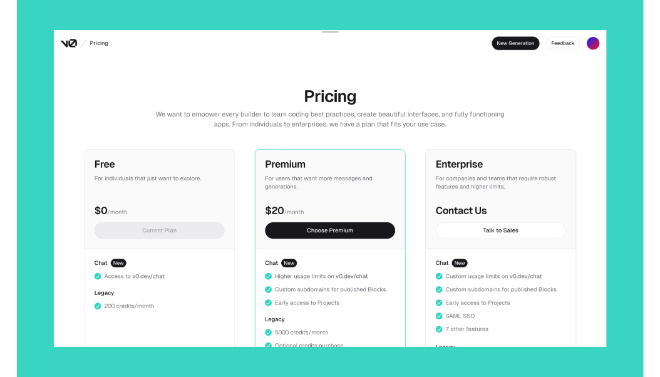
Vercel v0 operates on a credit-based model. Credits are consumed for each generation or complex prompt iteration.
Free
$0/month
5 monthly credits | Deploy apps, Design Mode, Public generations. |
Premium
$20/month
20 monthly credits | Private Generations, Figma Import, $2 daily bonus credit. |
Team
$30/user/month
30 monthly credits/user | Shared credits, Centralized billing, Team collaboration. |
Enterprise
Custom Pricing
Custom | SAML SSO, Role-Based Access Control, Priority Performance, Training Opt-out. |
Alternatives
Claude Artifacts (Anthropic)
Excels at conversational UI generation, providing production-ready components through conversation, often with superior code quality.
GitHub Copilot Chat
Provides AI assistance directly in your IDE, generating code and components that adhere to your existing project's codebase and conventions.
Lovable
A more comprehensive AI tool that focuses on generating entire application skeletons with proper architecture, rather than just individual UI components.
Share it on social media:
Questions and answers of the customers
There are no questions yet. Be the first to ask a question about this product.
